

 ChatGPT
 Perplexity
 Claude
 Gemini
 Grok
Grok
Google launched Pomelli Photoshoot on February 19, 2026. Within 48 hours it was everywhere. Designers shared outputs. Founders posted threads. Product Hunt lit up with reviews calling it a game-changer for small businesses.
The outputs looked good. A single product photo goes in. A studio-quality image comes out. For free.
That kind of frictionless value is real, and it matters for a lot of businesses. But as ecommerce teams started asking whether Pomelli could replace their current creative workflow, a more specific question surfaced: what exactly is Pomelli built to do?
The answer explains everything about where it fits and where it stops.
This isn’t a takedown of Pomelli. It’s a map of two genuinely different tools designed for two genuinely different problems. If you run a small business generating 10 to 20 product images per week, Pomelli may be exactly what you need. If you run an ecommerce team managing hundreds of SKUs across multiple channels with a production cycle that doesn’t stop, you need a different kind of system.
What follows is the full picture of both – what each tool is actually built to do, where each one runs out of road, and why the difference between them isn’t about quality. It’s about scope.
What Pomelli Is, Precisely
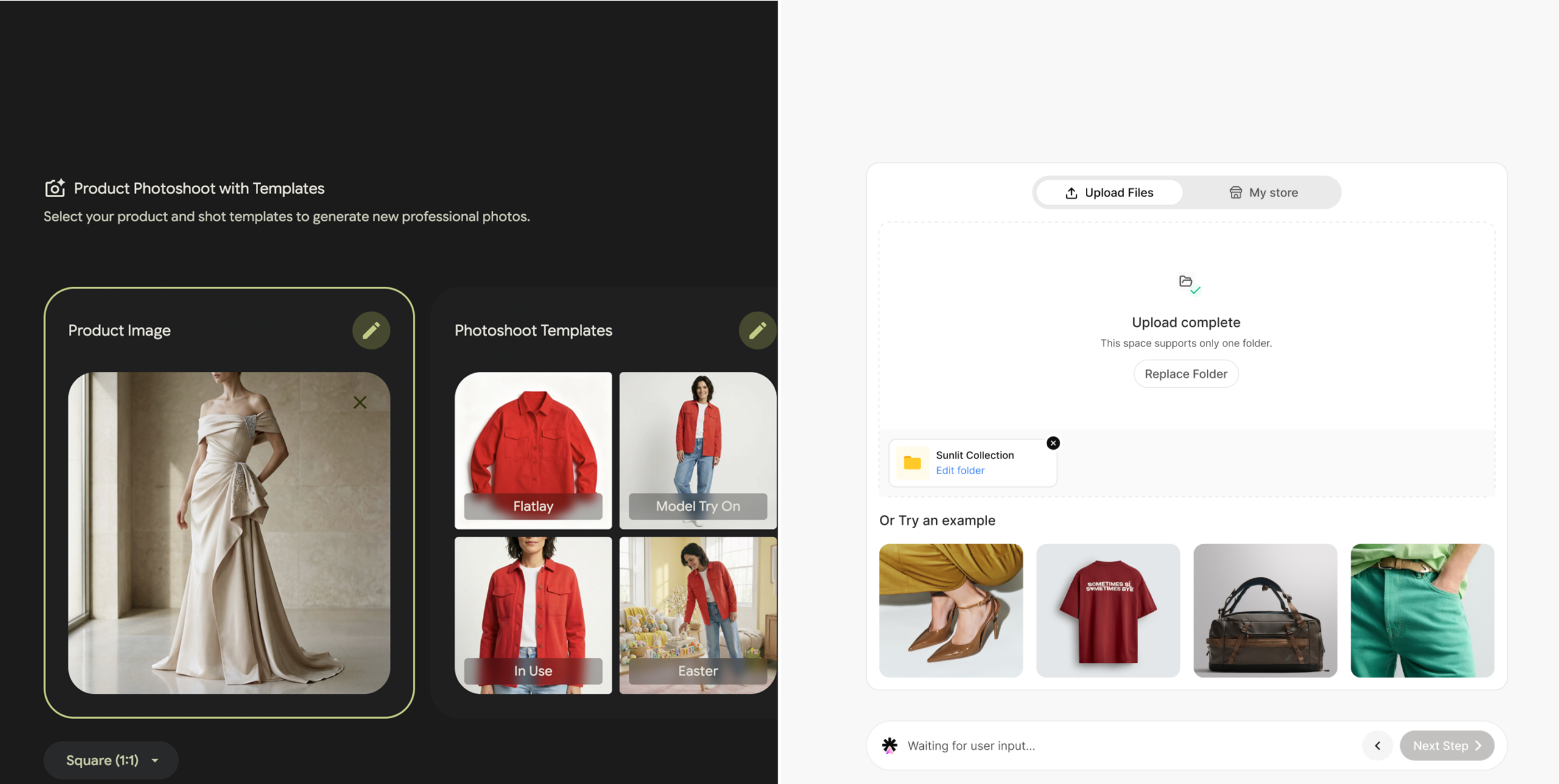
Pomelli is a Google Labs experiment, built in partnership with Google DeepMind and launched in public beta in October 2025 across the US, Canada, Australia, and New Zealand. Google built it for small to medium-sized businesses that need marketing content fast, with zero setup cost and no design background required.
Its core mechanism is the Business DNA profile. You enter your website URL and Pomelli scans it, extracting:
- Brand tone of voice (formal, playful, technical, conversational)
- Primary and secondary color palettes
- Typography and font styles
- Image aesthetics and visual style
- Existing imagery from your public web presence
From that profile, Pomelli generates campaign ideas, social media assets, and marketing visuals. All content draws from the DNA to maintain brand consistency across outputs.
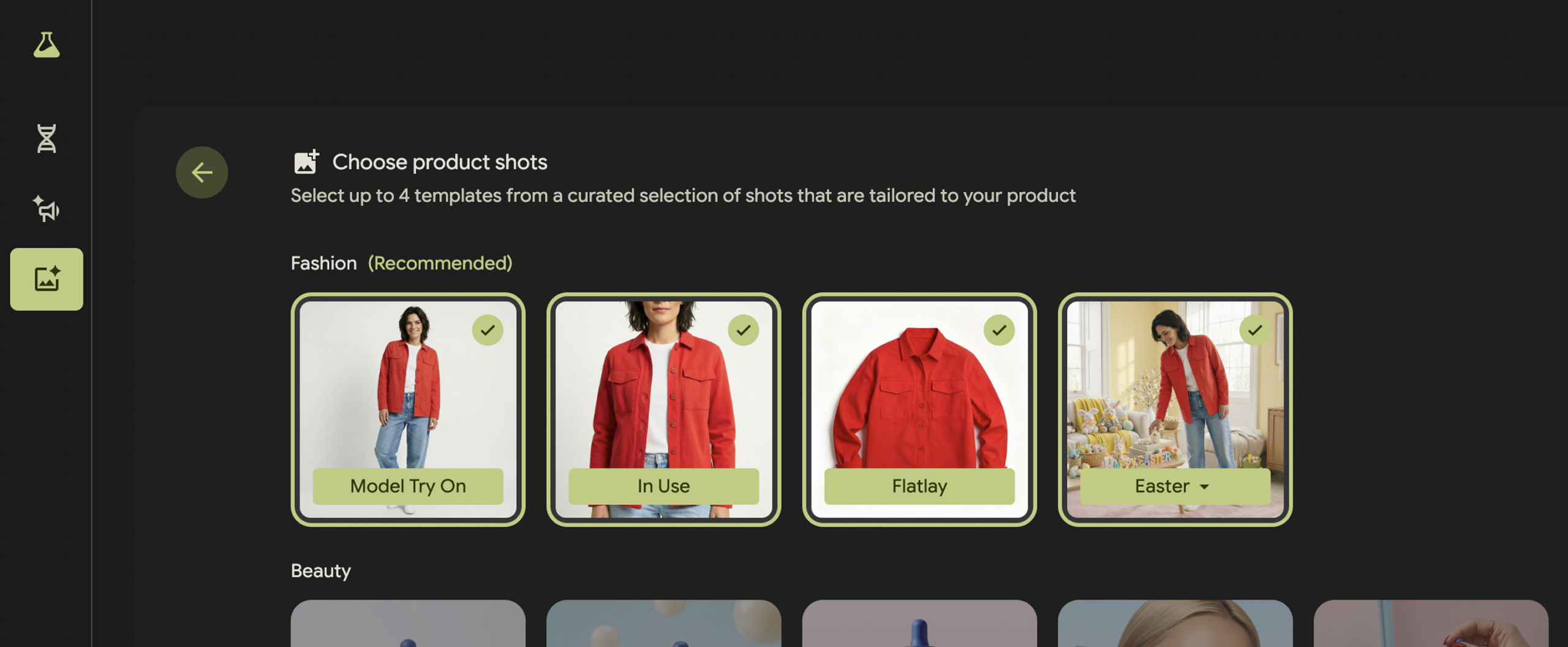
The Photoshoot feature, launched February 19, 2026, runs on Google’s Nano Banana image model. You upload a product photo (or paste a product URL), pick from five template types – Studio, Floating, Ingredient, In Use, Lifestyle – and generate a set of professional-looking images. Natural language editing works at the end for finishing touches. Style reference uploads let you restyle outputs to match a visual direction you provide.
What it does well:
- Zero to first output in under five minutes
- No brand setup required before generating
- Free during public beta
- Clean image quality for catalog and social use
- Natural language edits for quick corrections
- Product URL import pulls title, description, and images automatically
What it’s designed for:
- Solo founders and small business owners
- Marketing generalists managing one brand
- Businesses generating occasional product imagery
- Teams with no dedicated creative production workflow
Pomelli’s core design philosophy is removal of friction. You shouldn’t need a photographer. You shouldn’t need a design background. You shouldn’t need to spend money. For millions of businesses at an early stage of growth, that philosophy solves the right problem at exactly the right moment. The tool was built for them, and it works for them.
The question isn’t whether Pomelli is good. It’s whether it’s the right tool once your operation grows past the point where friction was ever the main problem.
👗 Fashion Brand Journey: The First Week with Pomelli
A founder runs a DTC women’s kurta brand out of Jaipur. She has 40 SKUs, no photographer on staff, and a product launch coming up in 10 days. She tries Pomelli.
On day one, she uploads her website URL. Pomelli reads the earthy color palette and the traditional craftsmanship aesthetic from her homepage. She uploads a flat-lay photo of a new kurta taken on her phone. Pomelli generates four Studio shots and two Lifestyle shots. Three of them are strong. She downloads, posts, gets good feedback.
On day three, she tries the next product. The DNA holds. The outputs feel consistent.
By day seven, she’s generated images for 15 products. Each session takes about 20 minutes. She’s happy.
By day 14, she has 40 products to cover, a Meta ad campaign to run, Amazon listings to fill, and a new festive collection dropping in six weeks with a completely different visual direction. She opens Pomelli and realizes she has to go product by product, session by session. The festive aesthetic she’s going for isn’t in her current DNA profile. She’d have to reset it and lose the setup she has now, or fight against it in every prompt. Pomelli is simply not built for this use case.
Where the Walls Appear
Pomelli’s Business DNA is built from a public website scan. For brands with a clear, consistent homepage, it works well as a starting point. For brands mid-rebrand, for brands whose best visual identity lives in three years of Shopify product archives rather than on their homepage, or for brands whose highest-performing creative lives inside Meta Ads Manager and never made it to the website, the scan gives Pomelli incomplete signal.
The output quality of every generation depends on how accurately that DNA reflects your actual brand. When the scan misses something, the prompt carries the correction load. Across a team of four people generating content on different days, that correction load compounds into visual drift – subtle at first, significant over time.
The specific limits ecommerce teams run into:
- Business DNA is a static snapshot. It captures what’s publicly visible on your site at scan time and doesn’t update as your brand evolves or as you learn what actually converts.
- No catalog integration. Pomelli doesn’t know your product catalog, your SKU IDs, variant data, inventory status, or collection structure.
- No performance feedback loop. Pomelli has no visibility into which generated images drove CTR, ROAS, or conversions after download. Every generation session starts from the same baseline, regardless of what you’ve learned.
- Single-product workflow. Each Photoshoot session handles one product. There is no batch mechanism for catalog-level generation.
- No team workflow layer. Generated images are downloaded and coordinated outside the tool.
- No channel-specific output pre-configuration. Meta ad dimensions, Amazon white-background specs, Google Shopping crops, and Instagram aspect ratios require manual adjustment after download.
- No long-term memory. Pomelli doesn’t remember what you generated last month, what worked, or what your production team decided to standardize.
For a business generating 10 to 20 images per week, none of these limits feel significant. For a brand running 50 new products per month across five channels, they’re the whole problem.
Each limit is manageable in isolation. Together, they define the ceiling of what’s possible with a general-purpose creative tool. The question for any growing brand is how close they are to that ceiling – and how quickly they’re approaching it.
📱 Electronics Brand Journey: The Catalog Scale Problem
A marketing team at an electronics accessories brand sells phone cases, chargers, and cable organizers across Shopify, Amazon India, and Flipkart. 300 active SKUs. New models drop every six weeks.
The team hears about Pomelli. They try it for a batch of 20 new phone cases. The outputs are decent – clean white-background studio shots. They download, manually resize for Amazon (2000x2000px) and Shopify (1200x1500px), and upload to both platforms.
Two weeks later, 60 more SKUs drop. They open Pomelli. 60 products, one session per product, five images per product, manual download, manual resize, manual upload. They estimate 40 hours of production work before the launch window closes.
That’s the moment they start looking for something built for catalog teams, not individual products.
Brand DNA vs. Brand Memory
Pomelli calls its brand intelligence system Business DNA. ShopOS calls its equivalent Brand Memory. The names suggest similar things. The architecture is different in ways that matter at production scale.
Pomelli Business DNA:
- Built from a one-time website scan
- Captures publicly visible brand elements: color, font, image style, tone
- Static profile – doesn’t update from generation outcomes
- Shared across all users of that account
- No performance correlation – DNA doesn’t know which visual choices converted
- Reset requires a full re-scan of your website
ShopOS Brand Memory:
- Built and maintained inside your commerce context graph
- Captures visual identity from your own uploads, approved creative, and generation history
- Dynamic – updates as your brand evolves and as performance data comes in
- Stores approved model aesthetics, lighting profiles, composition standards, background treatments, and color grading – all at a variable level, not just as style descriptions
- Tracks which visual variables correlate with conversion for your specific brand, catalog, and audience
- Applies automatically to every generation without requiring manual re-specification
- Separate memory layers for different channels – what works on Meta vs Amazon vs Instagram can differ, and Brand Memory knows the difference
The practical gap shows up at scale. A brand that has tested 12 variations of model lighting over 18 months has learned something specific: warm golden-hour lighting outperforms cool studio lighting on their product pages by a measurable margin. That learning lives in Brand Memory as a stored parameter. It applies to every generation automatically. A new team member running their first batch on a Tuesday benefits from 18 months of accumulated learning they never personally observed.
Pomelli’s Business DNA captures what your brand looks like. ShopOS Brand Memory captures what your brand has learned.
These aren’t interchangeable things. What something looks like is a starting point. What it has learned, tested, and validated over time is a competitive advantage. One is a description. The other is institutional knowledge – the kind that compounds.
👗 Fashion Brand Journey: Brand Memory in Action
The same fashion brand, 18 months later. The founder’s team now runs on ShopOS. Her Brand Memory contains:
- Three approved model aesthetics – petite South Asian, mid-size, plus-size – that tested well with her core audience segment
- Warm terracotta lighting that outperformed cool white studio lighting by 34% on her product pages
- Four background treatments with performance scores attached: terracotta gradient (#1), neutral linen (#2), outdoor terrace (#3), plain white (#4, used for Amazon only)
- Composition standards for each channel: full-body for Instagram, three-quarter for Shopify PDP, close-up detail for Amazon secondary images
When she launches the new festive collection, she builds a Moodboard with her reference imagery, sets the season tag, and runs a batch of 80 SKUs. Every output carries 18 months of what worked, applied automatically. No briefing, no re-specifying, no drift. The system knows what her brand has learned. It applies it without being asked.
The Commerce Context Graph
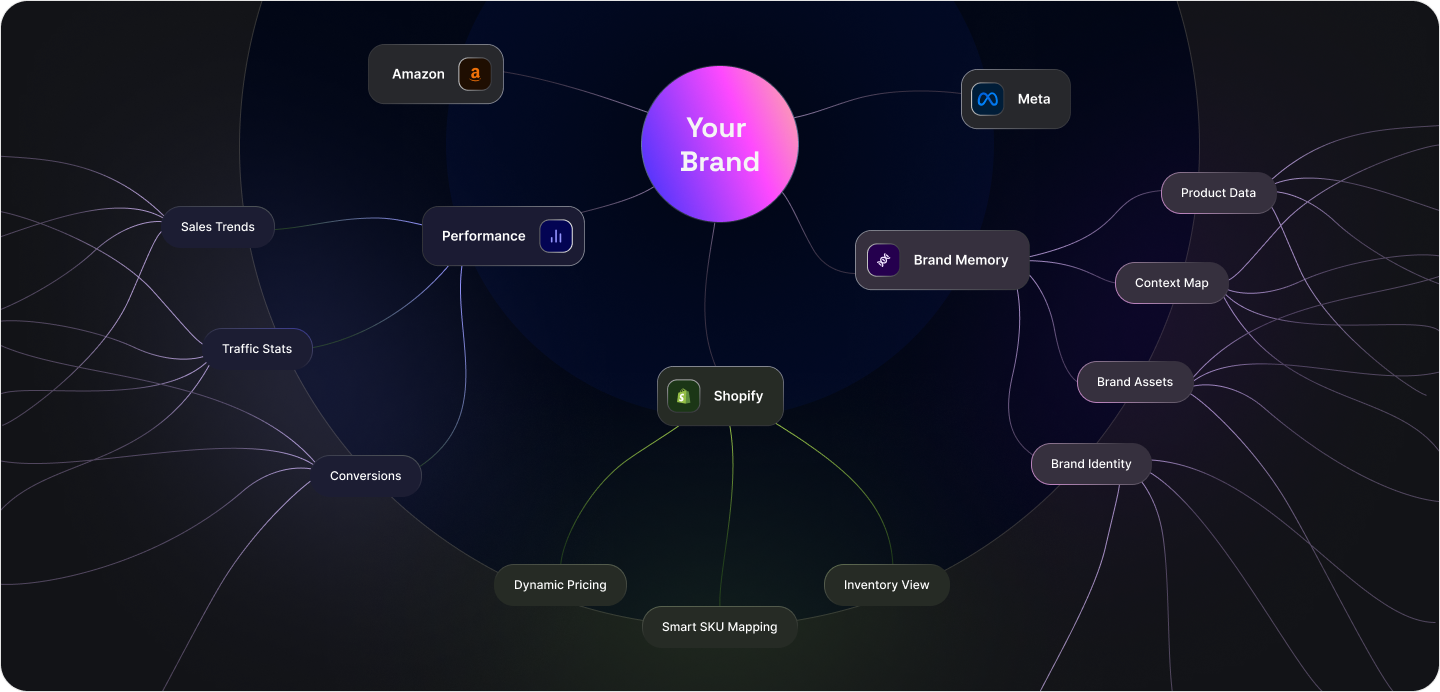
Brand Memory is one layer inside ShopOS’s commerce context graph. The graph is the larger system that makes everything work at scale.
A context graph is a connected data structure that links your brand identity, your Shopify product catalog, your generation history, and your performance data into a single queryable system. When ShopOS generates an image for a specific SKU, it draws from all four layers simultaneously.
What the context graph knows at generation time:
- Product title, description, tags, and metafields from Shopify
- Which collection the product belongs to and the active season tags
- Variant-level data: size, color, material, price point
- Inventory status (in stock, low stock, or out of stock)
- Historical performance of previous images for this product and similar products
- Brand Memory parameters: approved visual variables and their performance scores
- Channel destination: what’s being generated and where it’s going
What this changes about generation quality:
- A product tagged “formal” generates in a formal context without a prompt specifying it
- A summer collection product generates with summer-appropriate styling automatically
- A high-margin product can be flagged for premium treatment versus standard catalog output
- A product with a 14% return rate – often driven by inaccurate imagery – gets flagged for extra accuracy review
- Variant-level generation means a forest green dress in size 8 generates differently from a rust orange version, because the system knows the color and treats it accordingly
Pomelli generates images from prompts and Business DNA. The context for each generation comes from what you type, not from a connected data layer. For a single product, that’s fine. Across 300 SKUs with 1,200 variants, the manual context load becomes substantial – the accumulated weight of everything the system doesn’t know that a human has to manually supply, every single session.
📱 Electronics Brand Journey: Context Graph Solving Variant Accuracy
The electronics team joins ShopOS. They connect their Shopify store. The context graph immediately pulls in 300 SKUs with variant data.
When they generate for a phone case collection, each color variant generates with the correct product color applied accurately. The midnight black case generates with dark matte treatment. The pearl white generates with clean high-key lighting. The coral generates warm. They didn’t specify any of this per product. The variant data in the context graph handled it.
In six weeks of using batch generation, their return rate on phone case listings dropped by 8 percentage points. Product images were more accurate to the physical product. Customers received what they expected. The system’s knowledge of the catalog – the real catalog, with real variant attributes – produced something a prompt never could: consistency at the product level, not just the brand level.
Single Generation vs. Batch Generation
This is the most visible operational gap between the two tools – and for catalog-scale teams, it’s the one that matters most day to day.
How Pomelli handles volume:
- Each product is a separate session
- One product upload per session
- Manual template selection per session
- Manual download per session
- No mechanism to configure parameters once and run across many products
- No auto-linking of outputs to SKU records
- No structured output review across a catalog
How ShopOS Batch works:
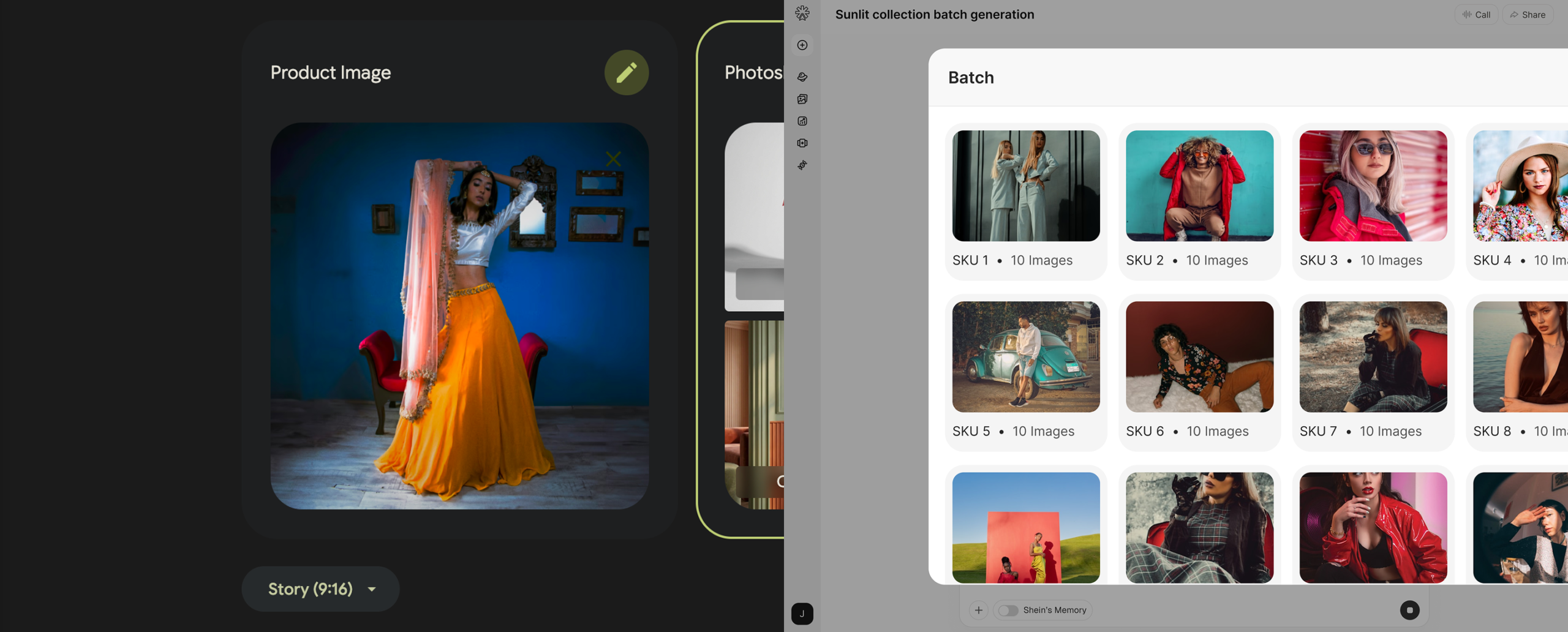
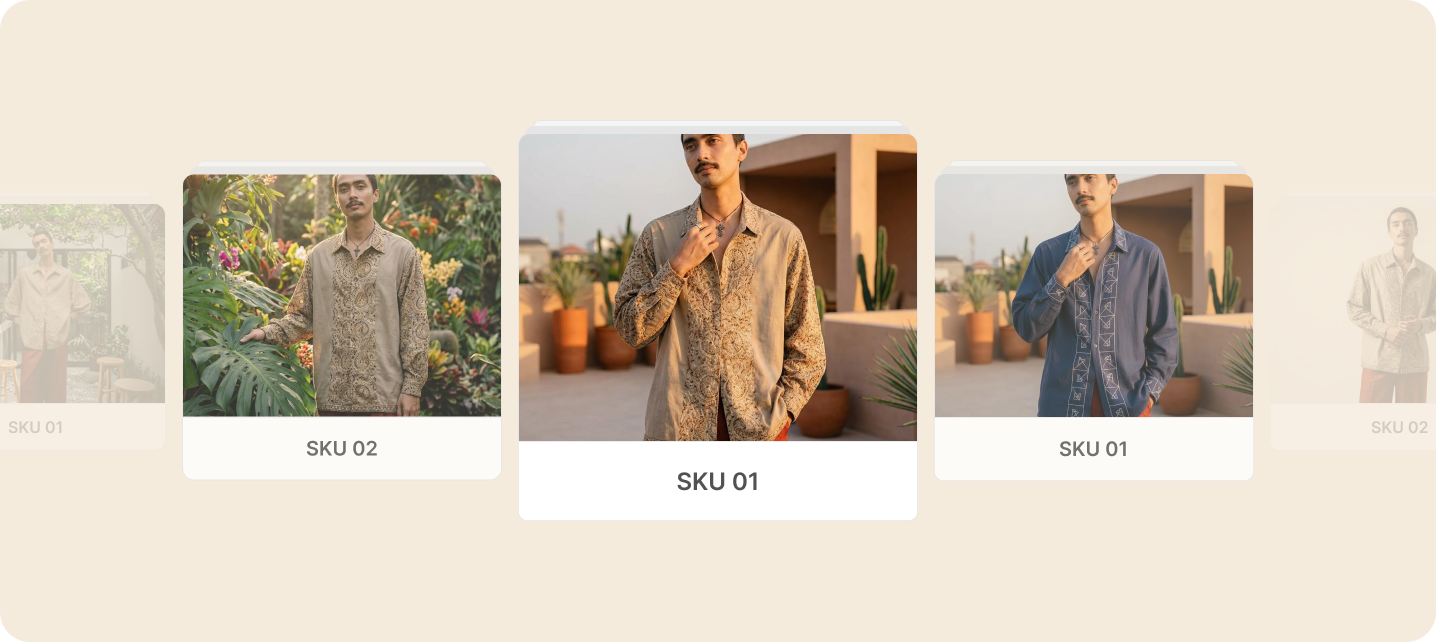
- Connect to your Shopify catalog and select any number of SKUs – 10, 100, or 500
- Set generation parameters once: model aesthetic, pose direction, background treatment, channel outputs, aspect ratios
- Run the full selection simultaneously, not sequentially
- Brand Memory applies to every output automatically
- Each generated image auto-links to its corresponding SKU in the Files library
- Channel-specific crops – 9:16 for Stories, 1:1 for feed, 2:3 for PDPs, 1:1 at 2000px for Amazon – generate in parallel
- When the batch completes, every output is organized by SKU, by channel, and by variant, with no manual cataloging required
The time math at 200 SKUs:
- Pomelli: approximately 8 to 12 minutes per product (upload, configure, generate, review, download, move to next) = 27 to 40 hours
- ShopOS Batch: approximately 35 minutes to configure parameters, run the batch, review outputs = under 2 hours
For weekly production cycles, that difference determines whether your team has time to actually work on the business or spends every week buried in content production. Over a full year of weekly launches, it’s the difference between a team that’s growing and a team that’s constantly catching up.
🧴 D2C Brand Journey: Batch Solving the Launch Window
A founder runs a D2C skincare brand. She launches new product bundles every four to six weeks. Each launch involves 35 to 50 product variants, each needing four channel-specific image versions. She was spending three weeks of every six-week cycle on content production. Half the cycle, gone – before a single campaign brief was written.
After switching to ShopOS Batch, production time dropped to two days per launch. The batch runs overnight. Morning review takes three to four hours. The remaining 16 days in the cycle moved into campaign strategy, influencer coordination, and customer research.
Her launch cadence didn’t change. What changed was how much of her team’s time went into making it happen – and what they were able to do with the time they got back.
Supporting Videos
Pomelli: Supports animated video from still images, added post-launch. You generate a product image and animate it into short motion content for social.
ShopOS:
- Product videos generate from your Shopify product data and Brand Memory, applying the same batch logic as image generation
- You’re not animating a single still – you’re generating video variants across a catalog, with brand-consistent treatment at batch scale
- Output formats pre-configured for performance channels: 9:16 for Stories and Reels, 1:1 for feed, 16:9 for YouTube product ads and Google Shopping video
- Lifestyle video generation puts your product in motion within a scene – a model wearing a garment, a skincare product being applied, a phone case being picked up – rather than just applying motion effects to a static image
- Brand Memory applies to video generation: the lighting, model aesthetic, and scene treatment match your image outputs across every channel, so your video content and your image content look like they came from the same brand
The difference between animating a still and generating a video from product context is the difference between decoration and communication. Animation adds motion. Video generation tells a product story.

📱 Electronics Brand Journey: Video for Product Listings
The electronics team uses ShopOS video generation to produce product videos for their Amazon listings. Each product gets a 15-second studio video – product rotating on a clean surface, with spec callouts at the end. They generate for 60 products in a single batch. Amazon’s A+ content requirement for video, which previously took three weeks and a significant agency budget, now takes two days.
The agency relationship didn’t end because video quality declined. It ended because the production timeline compressed to the point where an external dependency could no longer fit inside it.
Auto-Sync from Shopify
Pomelli’s product URL feature: You can paste a product URL and Pomelli pulls the product title, description, and images as generation context. For one product at a time, that’s convenient. For a catalog, you do this manually per product, per session. The context travels with you, but you carry it yourself.
ShopOS Shopify integration:
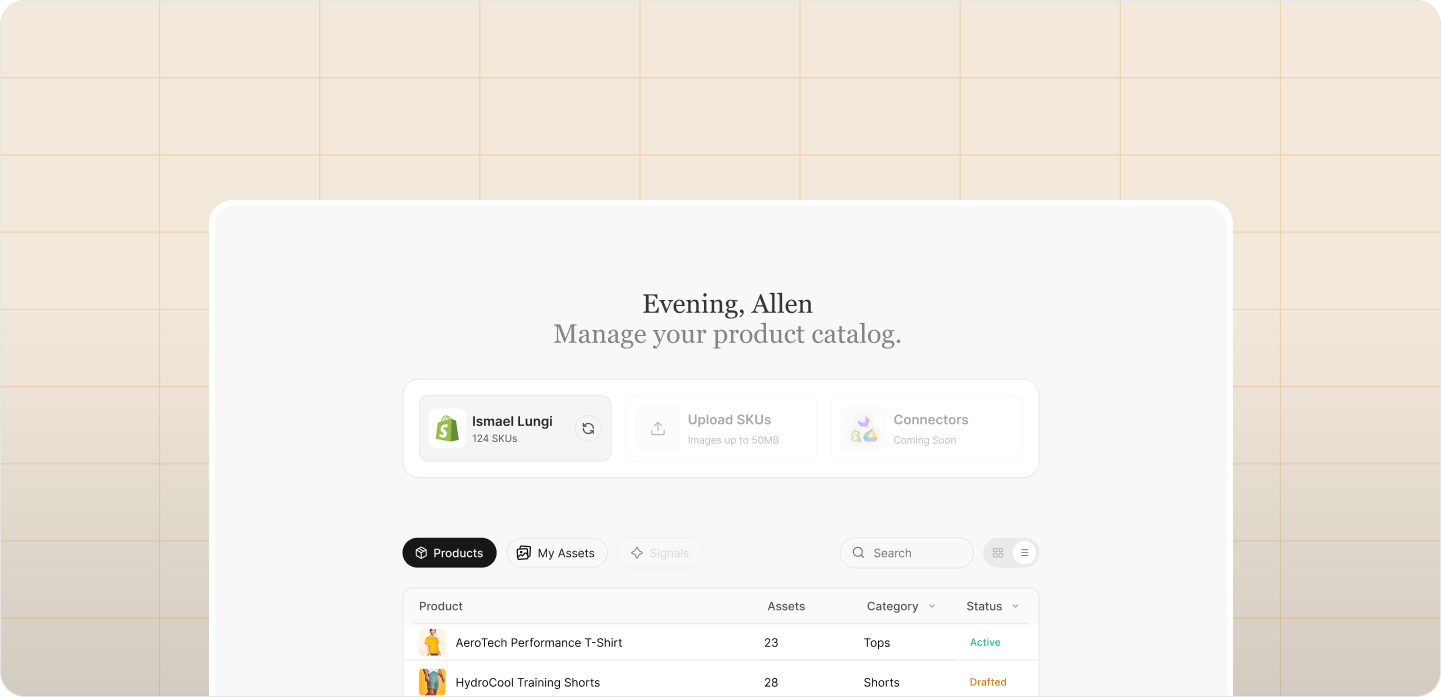
- Direct store connection pulls your full catalog automatically
- Syncs product titles, descriptions, tags, collections, and metafields
- Pulls variant data: SKU IDs, size options, color options, material attributes, price by variant
- Syncs inventory status – a product that goes out of stock can be flagged so generation stops for it automatically
- Collection and season tags from Shopify inform generation context without any manual setup
- When your catalog updates – new products added, variants changed, products archived – the integration reflects it without a manual re-import step
- Metafields, if you’ve built them out in Shopify, add generation signal: a product metafield tagged “hero product” can trigger premium generation treatment automatically
What Shopify sync changes practically:
- You never rebuild a product list inside your creative tool
- Every generation is anchored to the real product record, not a manually typed description that approximates it
- Accuracy problems – wrong color, wrong fit label, wrong material representation – reduce because the system generates from actual product data, not your prompt’s interpretation of it
- The gap between your Shopify catalog and your creative output closes, because they’re no longer separate systems that have to be manually reconciled
🧴 D2C Brand Journey: Shopify Sync Preventing Catalog Drift
The skincare team had a recurring problem: product images generated for one variant would accidentally get used on a different variant’s listing. A serum formulated for oily skin would end up photographed in a context suggesting dry skin benefits. Wrong imagery, wrong customer signal, wrong expectation set.
After connecting ShopOS to Shopify, every generation anchors to the variant record. The oily skin serum generates with appropriate visual context derived from its own product description and tags. Each output auto-links to the correct SKU in the Files library. The wrong image on the wrong listing problem stopped happening – not because the team got more careful, but because the system no longer allowed the disconnect to exist.
100+ Spaces: Photoshoot Is One of Them
This is a meaningful architectural difference between the two tools, and one that becomes more important the more content types a brand produces.
Pomelli’s Photoshoot feature covers product photography. It’s the primary visual generation capability in the platform.
ShopOS organizes generation by Spaces. A Space is a configured environment built for a specific ecommerce content job. Photoshoot-style product photography is one Space. It sits alongside more than 100 others, each purpose-built for a specific production task.
Sample of ShopOS Spaces by category:
Catalog & Product:
- Product photoshoot (on-model, flat-lay, ghost mannequin, studio)
- White-background marketplace imagery (Amazon, Flipkart, Myntra spec-ready)
- Product detail and close-up generation
- Ghost mannequin and layflat for apparel
- Packshot for CPG and beauty
Advertising:
- Meta (Facebook/Instagram) ad creative generation
- Google Shopping imagery (feed-spec compliant)
- YouTube product ad frames
- Display banner generation across standard IAB sizes
- Dynamic ad variant generation (background swaps, headline overlays)
Social:
- Instagram feed post generation
- Instagram Story and Reel cover frames
- Pinterest product pin generation
- LinkedIn product announcement imagery
Campaigns & Brand:
- Seasonal campaign asset generation
- Brand lookbook creation
- Editorial lifestyle shoot generation
- Moodboard-driven campaign imagery
Marketplace & Retail:
- Amazon A+ content imagery
- Shopify product page hero images
- Category banner generation
- Email header image generation
Video:
- Product video (studio)
- Lifestyle product video
- Unboxing video generation
- Social short-form video (9:16)
What this means in practice:
Your team doesn’t rebuild generation parameters each time they switch between content types. The fashion photoshoot Space and the Meta ad creative Space both draw from the same Brand Memory and commerce context graph. The outputs stay visually consistent across every content type, not just within each one.
A product image generated in the Catalog Space and a Meta ad generated in the Advertising Space look like they came from the same brand, because they did, from the same Brand Memory, the same performance data, the same approved visual variables. The consistency isn’t enforced manually by your team. It’s structural.
👗 Fashion Brand Journey: One Brand, Seven Spaces Per Launch
The fashion brand’s team now runs seven Spaces for every collection launch:
- On-model photoshoot (Catalog Space) – hero images for Shopify PDPs
- White-background (Marketplace Space) – Amazon and Myntra listings
- Instagram feed creative (Social Space) – launch day posts
- Story frames (Social Space) – countdown and launch announcement
- Meta ad creative (Advertising Space) – three variants per product for performance testing
- Email header (Brand Space) – launch newsletter visual
- Lookbook pages (Campaign Space) – seasonal editorial used in PR and press assets
All seven draw from the same Brand Memory. All seven are brand-consistent without any cross-referencing between sessions. The festive collection carries a different visual direction from the everyday line, and the Moodboard built for it carries that direction across all seven Spaces simultaneously. Seven output types. One creative direction. No briefing duplication.
Templates, Models, Poses, and Backgrounds
Pomelli’s Photoshoot library:
- Five template types: Studio, Floating, Ingredient, In Use, Lifestyle
- Model generation available within the “In Use” template
- Style reference upload for visual direction
- Natural language background editing
ShopOS’s library, purpose-built for ecommerce:
Backgrounds:
- Hundreds of background treatments organized by channel and use case
- White-background variants: pure white, off-white, gradient, shadow variations (Amazon compliant)
- Gradient backgrounds by color family, for D2C brand page use
- Contextual lifestyle backgrounds: home, studio, outdoor, seasonal, urban
- Category-specific backgrounds: kitchen settings for CPG, bedroom settings for home goods, outdoor terrain for footwear, retail environments for apparel
- Background performance tags drawn from Brand Memory, showing which backgrounds drove best CTR for your brand specifically
Models:
- Thousands of model variants
- Filters: skin tone, body type (petite, standard, mid-size, plus-size), age range, aesthetic (editorial, commercial, lifestyle)
- Category-optimized model generation: footwear models pose differently from apparel models, which pose differently from accessories models
- Consistent model identity across a batch – the same approved model used across all 80 products in your collection without drift between products
- Brand Memory stores your approved model choices so they persist across every generation session without re-selection
Poses:
- Pose libraries broken down by product category
- Apparel: front-facing, three-quarter, back detail, movement, seated
- Footwear: standing, walking, seated with leg extension, flat-lay
- Accessories: wrist shots, close-up detail, styled flatlays, worn context
- Electronics: hands-on, desk context, lifestyle use, detail shots
- Pose performance data available: which poses converted best for your SKU category
Aspect Ratios and Channel Presets:
- Pre-configured outputs for: Shopify PDP (2:3), Amazon (1:1 at 2000px minimum), Instagram feed (1:1, 4:5), Instagram Stories (9:16), Meta ads (1:1, 1.91:1), Google Shopping (1:1), Pinterest (2:3)
- One generation produces all channel variants simultaneously – no post-processing resizing, no manual cropping, no format conversion
📱 Electronics Brand: Pose Library for Accurate Product Use Context
The electronics team generates product imagery for a wireless charging pad. Using the ShopOS hands-on electronics pose library, they generate three variants: phone placed on pad from above, hand placing phone on pad, and pad in desk context with laptop in background.
All three are generated in a single batch session. All three match the brand’s cool-toned neutral aesthetic from Brand Memory. All three come out in the correct dimensions for Amazon primary, Amazon secondary, and Google Shopping feed simultaneously.
Previously, getting these three shot types from a studio took two weeks and a significant per-product cost. Now it’s one batch session, two hours of review, and done – with the outputs automatically linked to the correct SKU records and ready for deployment.
Moodboards
Pomelli’s approach: The Business DNA, inferred from your website scan, carries your visual direction. You don’t build a brief before generating. Direction comes through prompting during the generation session: you describe what you want in words, and the system tries to interpret that description into an image.
ShopOS Moodboards:
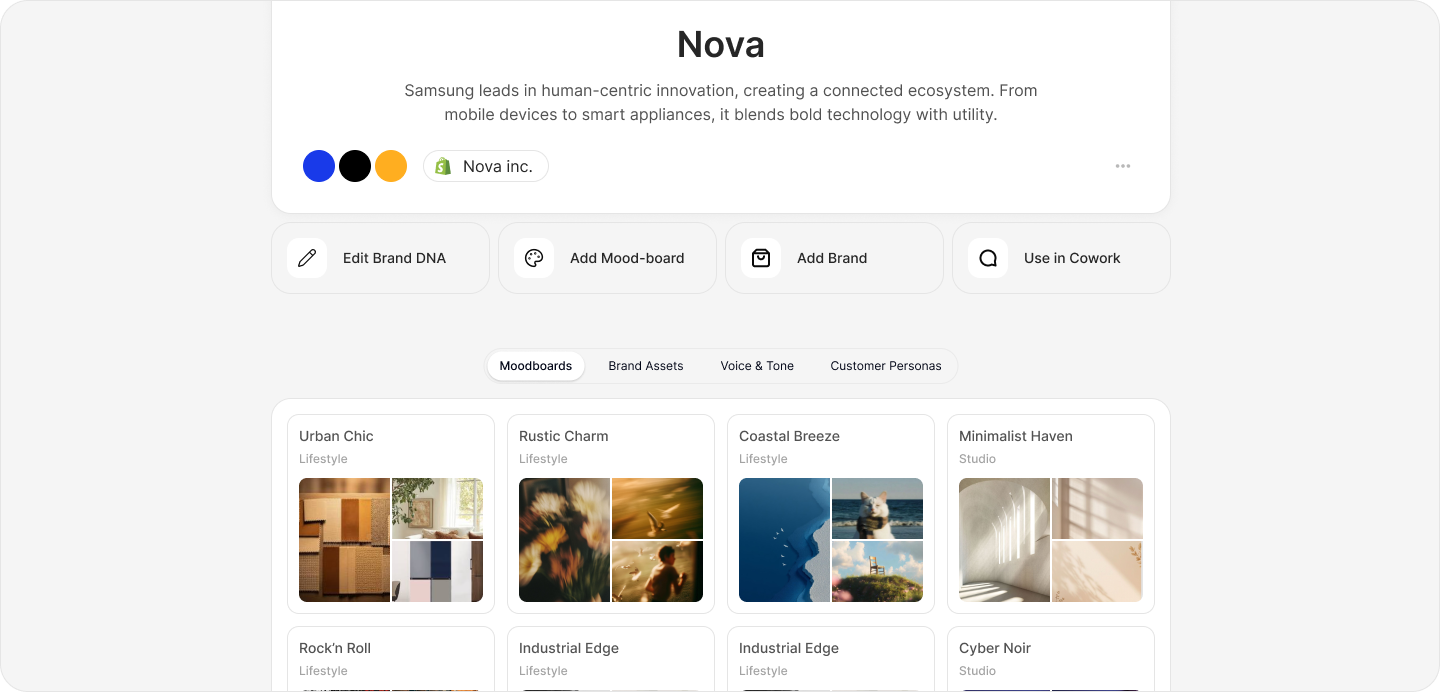
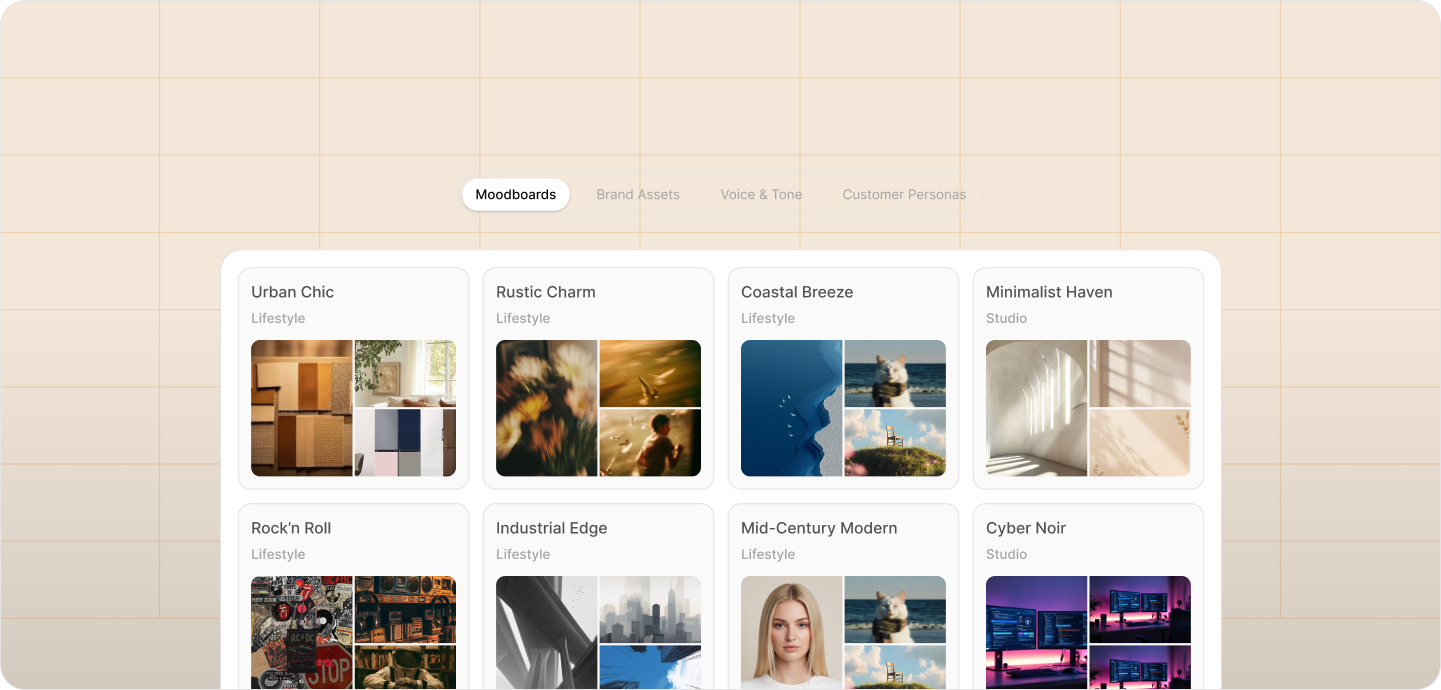
- Build visual direction before you generate, inside the platform
- Pull reference images from anywhere: past campaign assets, competitor references, color palette images, editorial photography, archival brand materials
- Add color swatches, typography references, and written direction notes to the board
- The Moodboard becomes the visual context for your entire generation session – not just the first prompt, but every output in the batch
- AI reads the Moodboard as a structured visual reference, not a text description of a visual
- Multiple Moodboards can exist simultaneously: one for your everyday catalog, one for your festive campaign, one for your upcoming collaboration
- Moodboards can be saved and reused for future launches with similar visual direction
- Team members can contribute to a Moodboard before the generation session begins, resolving creative direction alignment before a single image is generated
Why this matters for seasonal brands:
A brand launching a summer collection has a specific visual direction that differs from their winter catalog. That direction lives in reference images, not in text descriptions. A Moodboard lets the creative team load that visual direction into the system directly. The outputs land closer to the intended direction on the first pass. Fewer iteration cycles, faster final approval, less creative energy spent correcting instead of producing.
The difference between briefing with words and briefing with images is the difference between describing a color and showing it. One is approximate. The other is exact.
👗 Fashion Brand: Moodboard Collapsing the Brief-to-Output Cycle
For the festive collection, the brief was: deep jewel tones, Mughal-inspired architectural backgrounds, evening light, rich fabric textures foregrounded. That direction is difficult to capture in a prompt. It’s easy to show.
The team pulled 14 reference images into a ShopOS Moodboard: two archival fashion editorials, three architectural photographs of Mughal-era settings, four color palette references, three images of fabric texture treatment they wanted to match.
The first batch run generated outputs that were 80% of the way there on the first pass. In the previous cycle using prompt-based tools, they typically needed three rounds of iteration to reach the same place. The Moodboard collapsed four hours of prompt iteration into 40 minutes of review – and the creative director’s input went into the Moodboard upfront rather than into correction feedback afterward.
Refine
Pomelli’s correction path: When an image is 95% right and 5% wrong, the fix is regeneration. You re-prompt, regenerate the whole image, and review the new output for new issues. Everything that was working – the lighting, the composition, the model positioning – can change in a new generation. Fixing one thing means accepting risk across everything else.
ShopOS Refine:
- Drop a pin on the specific area of the image that needs correction
- Describe the change in natural language: “the collar should be V-neck, not crew neck” or “the background has a green cast here, pull it warmer” or “the fabric is reading as silk but it should look like cotton”
- The system processes a regional edit – only the flagged area changes
- The lighting, model, background, composition, and brand treatment outside the flagged region stay intact
- Multiple pins can be placed on a single image for simultaneous regional edits
- Refine works on batched outputs directly – you don’t re-run the whole batch to fix 15 images in it
- Every refined image maintains its auto-link to its Shopify SKU and Files library record
The operational math:
A 200-SKU batch where 15 images need minor corrections:
- Full regeneration path: re-queue 15, generate 15, review 15 new outputs for new issues, fix new issues if they appear – 2+ hours, and no guarantee the corrections hold
- ShopOS Refine: 15 pins placed with notes, processed, reviewed, approved – 20 minutes
Over 12 months of weekly production cycles, that difference compounds into hundreds of hours of production time recovered. More importantly, it removes the anxiety of correction. When fixing something can’t break something else, teams fix things sooner, more confidently, and with higher final quality.
🧴 D2C Brand Journey: Refine Catching Packaging Accuracy Issues
The skincare team generates 40 product images for a new serum line. Three images have a label accuracy issue: the product name on the bottle in the generated image doesn’t match the actual product label exactly. In a tool requiring full regeneration, fixing three images risks introducing new composition or lighting issues that then need their own fixing.
With ShopOS Refine, they drop a pin on the label area of each affected image, note the correction, and the system updates only that region. The lighting, model hands, bottle glass treatment, and background stay exactly as approved. Corrections done in 12 minutes. The rest of the batch moves to deployment untouched.
Cowork
Pomelli: Image generation only. No team workflow layer. Download and coordinate outside the tool via Slack, email, or shared drives. The tool’s job ends at the download button.
ShopOS Cowork:
- Multiple team members work inside the same generation session simultaneously
- Role-specific views: the performance marketer sees flagging controls for ad testing; the brand manager sees approval and rejection controls; the copywriter sees the description workspace attached to each SKU
- Real-time commenting on any output, attached to the specific image and SKU record
- Approval workflow built in: outputs move through Draft → Reviewed → Approved → Ready for Export without leaving the platform
- Copywriting workspace is attached to the same SKU the image is generated for – product descriptions, ad copy, and alt text are written in the same workflow where the image is produced
- All decisions are logged: who approved, who flagged, what notes were left, what changed between draft and final
- When the session closes, approved images are linked to their SKUs, copy is attached, and everything exports or deploys to Shopify directly
What this replaces:
- Shared Dropbox folders with version-numbered files and no clear record of which version was final
- Slack threads with image attachments trying to find the right version three weeks later
- Separate Google Docs for product copy that drift out of sync with the images they were written for
- Spreadsheets tracking which products are done and which aren’t, updated manually and inconsistently
- Email approval chains that take three days for a decision that takes 30 seconds in a room together
Every one of those systems exists because the creative tool didn’t include workflow. Cowork closes the gap.
👗 Fashion Brand: Cowork Cutting the Review Cycle
Before ShopOS, the fashion team ran a four-person review process across WhatsApp, Google Drive, and email. Average time from generation to approved final assets: 6 days. That timeline wasn’t because decisions were hard. It was because the coordination overhead of moving assets between systems, tracking which version was current, and getting four people to look at the same thing at the same time took most of the week.
After switching to Cowork, the same four-person review process runs inside a single session. Average time from generation to approved final assets: 14 hours.
The sessions are now scheduled on Monday mornings. By Tuesday afternoon, 80 SKUs are approved, tagged, and ready to deploy. The week opens up. The team works on the business instead of managing files.
Loops: The Performance Feedback System
This is the biggest structural difference between a general AI creative tool and a platform built for ecommerce performance. It’s also the one that matters most over time.
Pomelli: Has no visibility into what happens after you download an image. Performance data from Meta Ads Manager, Shopify Analytics, or Amazon Seller Central doesn’t flow back into Pomelli. Every new generation starts without knowledge of what the previous generation produced in terms of results. The tool has no memory of what worked.
ShopOS Loops:
- Connects your ad platform performance data (Meta, Google, TikTok) to your generation pipeline
- Tracks CTR, ROAS, and conversion rate by creative variant down to specific visual variables: background treatment, model pose, lighting style, composition
- Connects Shopify Analytics: which product page images correlate with higher add-to-cart rate and lower return rates
- Connects marketplace performance: which images drove better ranking and conversion on Amazon and Flipkart listings
- All of this performance data feeds into the commerce context graph, which updates Brand Memory with what worked
- The next batch you generate draws from a richer, more accurate Brand Memory than the last one did
- Loops runs automatically – no manual briefing required to transmit performance learnings back into generation
The compounding effect:
- Month 1: Outputs are brand-consistent.
- Month 3: Outputs are brand-consistent and informed by three months of performance data on your specific audience, your specific catalog, and your specific channels.
- Month 6: The background treatment in your Brand Memory is the one that demonstrated a statistically significant CTR advantage. The model pose is the one that correlated with lower return rates. The lighting is the one that drove the highest ROAS in your last five Meta campaigns.
- Month 12: Your generation pipeline produces outputs that outperform what any single human creative director briefing from memory could deliver, because no human creative director has access to the granular correlation data across 12 months and every SKU in your catalog simultaneously.
A creative tool without a feedback loop is a tool that generates at a fixed quality ceiling. A system with a feedback loop gets better every time you use it. The gap between those two widens every month.
🧴 D2C Brand: Loops Surfacing an Unexpected Winner
The skincare team ran three background variants for their hydrating face wash: clean white, pale sage green, and a wet-surface lifestyle treatment. Conventional wisdom in the team said white would perform best for a mass-market product. White had always been the default. White felt safe.
Loops data after six weeks: the wet-surface lifestyle treatment drove 22% higher CTR on Instagram and 18% higher ROAS on Meta. The Brand Memory updated. Every subsequent generation for water-based products in the catalog now generates with the wet-surface treatment as the primary variant.
No manual briefing changed. No one called a meeting about it. The system absorbed the learning and applied it. Six weeks of performance data overrode three years of assumption.
Skills: Specialized Ecommerce AI Capabilities
Pomelli is a general-purpose marketing tool. Its image generation is designed to serve any business category: jewelry, food, yoga studios, professional services. That breadth is a feature for a tool targeting all small businesses. It’s a limitation for a team that needs depth in a specific domain.
ShopOS Skills are modular AI capabilities purpose-built for specific ecommerce workflows. Each Skill is trained for its task, not adapted from a general model asked to do something adjacent to what it was built for.
Current ShopOS Skills:
- AI Fashion Model Generation: Trained specifically for garment accuracy, fabric rendering, fit representation, body proportion accuracy, and model consistency across a catalog. A general model handles all of these as part of a much broader task. This Skill handles nothing else.
- Product Video Creation: Generates product video for catalog, social, and marketplace channels from product data and Brand Memory.
- Marketplace Listing Optimization: Generates and structures product titles, bullet points, and descriptions for Amazon, Flipkart, and Myntra – formatted to each platform’s ranking algorithm requirements.
- Ad Creative Scaling: Takes a winning creative concept and generates variants across dimensions, audiences, and copy treatments for performance testing at scale.
- Description Generation from Product Attributes: Generates product descriptions, SEO metadata, and alt text directly from Shopify product data. No manual brief required.
- Background Replacement: Replaces product backgrounds at batch scale while preserving product accuracy and brand-consistent treatment.
- Ghost Mannequin Generation: Generates ghost mannequin imagery for apparel from flat or on-model product photos.
- Lifestyle Scene Generation: Places products into contextual lifestyle scenes – a candle on a marble side table, a phone case on a coffee shop desk – with brand-consistent scene treatment.
The difference between a generalist AI and a specialized Skill is the difference between a contractor who can do the job and a specialist who has done nothing but that job for two years. For high-volume ecommerce production, that distinction shows up in output quality, in accuracy, and in the number of corrections needed before an image is deployment-ready.
Files Library: The Asset Management Layer
Pomelli generates images. You download them. Where they go after download is your problem – your Dropbox, your Google Drive, your Slack, your Shopify media library uploaded manually, one product at a time.
ShopOS Files Library:
- Every generated image auto-links to its corresponding Shopify SKU at generation time
- Organized by product, by channel, by campaign, and by generation date
- Version history: every iteration of an image for a SKU is preserved, not overwritten – you can always see what changed and why
- Performance data attached to each file: CTR, ROAS, and conversion scores from Loops update the file record as data comes in
- Assets can be deployed directly from Files to Shopify product listings, without downloading and re-uploading
- Files are searchable by SKU ID, product name, collection, channel, generation date, and performance score
- Approved assets are tagged by the Cowork team during review and move automatically to a deployment-ready folder
- Assets retired from active use are archived, not deleted – the performance data they generated remains in the context graph
For a team managing hundreds of SKUs across multiple channels, asset management isn’t a secondary concern. It’s the infrastructure that determines whether creative production compounds into a usable library or disappears into a folder hierarchy that nobody can navigate six months later. Files makes the library permanent, organized, and queryable.
Creative Director AI
ShopOS includes an AI Creative Director available throughout the production workflow. It’s not a chatbot for prompting help. It’s a review and direction layer that sits across the entire generation process.
What it does:
- Reviews your generation brief against your Brand Memory before a batch runs – flags inconsistencies before they produce bad outputs at scale
- Suggests visual direction adjustments based on recent performance data: “Your last three collections performed better with warm lighting. Your current brief specifies cool. Confirm or adjust.”
- Reviews completed batch outputs against brand standards and flags deviations before the team review begins, so human review time goes toward decisions rather than detection
- Provides written direction on Moodboard composition: what’s missing, what’s conflicting, what’s visually redundant
- Acts as an always-on creative brief advisor for team members who are new to the brand’s visual identity and don’t yet have the context a senior creative director carries
For teams without an in-house creative director, this function runs at the platform level. For teams that have one, it acts as a first-pass review layer that catches issues before expensive human review time is spent on them. The creative director’s judgment goes into the Moodboard and the Brand Memory. The AI applies it consistently, at every scale, without variability.
Dedicated Account Management
Pomelli is a self-serve tool in public beta. Google provides documentation and support forums. For a small business owner learning the tool on a Sunday afternoon, that’s appropriate support for the product.
ShopOS assigns a dedicated account manager for enterprise deployments. That person:
- Handles onboarding and production system configuration
- Sets up Shopify integration and validates SKU data structure
- Configures channel-specific output presets for your platform mix
- Reviews initial Brand Memory setup and validates it against your actual brand standards, not your website scan
- Manages ongoing optimization: quarterly reviews of Loops performance data and generation parameter recommendations based on what’s working
- Coordinates with your team on major launches that require production planning – seasonal campaigns, brand relaunches, large collection drops with tight windows
- Available for escalation when production issues arise on tight launch windows where there’s no room for a support ticket and a 48-hour response time
For a brand managing a catalog of 1,000+ SKUs with a production team of four to eight people and a weekly launch cycle, a dedicated account manager is not a premium extra. It’s operational infrastructure. The difference between a broken production run at 11pm on a launch night being resolved in 20 minutes or 48 hours can be measured in revenue.
Full Feature Comparison
| Feature | Google Pomelli | ShopOS |
| Brand Identity System | Business DNA (website scan, static) | Brand Memory (commerce context graph, dynamic) |
| Brand Memory Updates From Performance | ✗ | ✓ (Loops) |
| Shopify Catalog Integration | Product URL (manual, per product) | Direct store sync (full catalog, auto-updating) |
| Variant-Level Data in Generation | ✗ | ✓ (size, color, material, price, tags) |
| Inventory Status Awareness | ✗ | ✓ |
| Batch Generation | ✗ | ✓ (100–500+ SKUs simultaneously) |
| Single-Product Generation | ✓ | ✓ |
| Commerce Context Graph | ✗ | ✓ |
| Performance Feedback Loop (Loops) | ✗ | ✓ |
| CTR / ROAS Data Attached to Outputs | ✗ | ✓ |
| Moodboards | ✗ | ✓ |
| Pre-Generation Visual Direction Briefs | ✗ | ✓ |
| Refine (Regional Image Editing) | ✗ (full regeneration only) | ✓ |
| Team Workflow / Cowork | ✗ | ✓ |
| Approval Workflow | ✗ | ✓ |
| Copywriting Workspace (Same Session) | ✗ | ✓ |
| Asset Auto-Links to SKU | ✗ | ✓ |
| Files Library with Performance Tags | ✗ | ✓ |
| Direct Deploy to Shopify | ✗ | ✓ |
| Product Video Generation | ✓ (animation from still) | ✓ (lifestyle video, studio video, batch) |
| Channel-Specific Aspect Ratios | Manual post-processing | Pre-configured in batch |
| Number of Spaces / Content Types | 1 (Photoshoot) | 100+ |
| Model Library (Body Type, Skin Tone Filters) | Limited | Thousands of variants with filters |
| Background Library (Ecommerce-Specific) | 5 templates | Hundreds with channel and use-case organization |
| Pose Library (Category-Specific) | ✗ | ✓ |
| Ghost Mannequin Generation | ✗ | ✓ |
| Marketplace Listing Optimization | ✗ | ✓ (Amazon, Flipkart, Myntra) |
| Ad Creative Scaling | ✗ | ✓ |
| Description Generation from Product Data | ✗ | ✓ |
| Skills (Purpose-Built Ecommerce AI Modules) | ✗ | ✓ |
| AI Creative Director | ✗ | ✓ |
| Dedicated Account Manager | ✗ | ✓ (enterprise) |
| Multi-Brand Support | ✗ | ✓ |
| Version History per SKU | ✗ | ✓ |
| Setup Required | None (website scan) | Shopify integration + Brand Memory setup |
| Pricing | Free (beta) | Paid |
| Geographic Availability | US, CA, AU, NZ | Global |
| Primary Use Case | SMBs, solo founders, occasional generation | Ecommerce teams, catalog production, performance-driven creative |
Breaking Ice vs. Breaking the Iceberg
Pomelli is made to break the ice.
It removes the biggest barrier most small businesses face: getting a professional-looking product image without a photographer, a studio, or a design team. It does that job well, and it does it for free. For a founder photographing products on a phone and posting to Instagram, Pomelli is the difference between looking like a business and looking like a side project. That matters. Google built it for exactly that person, and it delivers for them.
The energy around Pomelli’s launch was real because the problem it solves is real. Millions of businesses are stuck at the first image. Pomelli unsticks them. That’s a meaningful thing to build.
But most growing ecommerce brands aren’t stuck on the first barrier. They moved past it. They already know AI can generate product images. Their bottleneck is something else entirely.
It’s the iceberg underneath the surface.
The iceberg is a catalog of 300 SKUs that needs images across six channels, every six weeks, generated by a team of four people who also run ads, manage customer service, and coordinate with suppliers. The iceberg is a brand that spent three years building a specific visual identity – tested, refined, performance-validated – that needs to stay consistent across every piece of content that touches a customer. The iceberg is the knowledge locked inside 18 months of campaign data that nobody has time to manually extract and brief into every generation session. The iceberg is the coordination overhead of four people reviewing, approving, and deploying content across platforms that don’t talk to each other. The iceberg is the question nobody has a good answer to yet: which images are actually driving revenue, and how do you make more of them?
Pomelli gives you a clean first image. ShopOS gives you a system that gets better every time you use it, runs at the scale your catalog demands, keeps your brand consistent without requiring anyone to manually enforce it, and feeds what works back into what you generate next.
The brands that stay small use a tool to make better-looking content. The brands that grow build a system that makes content that sells. At some point in every growing brand’s lifecycle, the tool that got them here stops being the thing that gets them there.
ShopOS is where teams come when they’ve finished breaking the ice and are ready to get through the iceberg.
Start your free ShopOS trial. Sell like the big boys.