

 ChatGPT
 Perplexity
 Claude
 Gemini
 Grok
Grok
Key takeaways
- The crowd is huge and eager: NRF’s survey found 202.9 million holiday shoppers in 2025, the most on record (NRF).
- Orders arrive like a fast, brutal wave. ShipBob measured Black Friday order volume 236% above an average October Friday (ShipBob).
- Small mistakes cost the most, and they hurt. Hidden costs scare buyers away, and 40% of shoppers cited them when abandoning a cart (Baymard).
- A Black Friday checklist works only with real dates, honest owners, and a calm freeze before the peak.
A founder prints a long list on a tense Sunday night. By Wednesday, the page is stained with coffee, half the boxes are empty, and Black Friday feels scarier than ever. Sound familiar? Everyone has been there.
The fix isn’t a longer list. It’s a smart, simple one, sorted by work stream, dated, and short enough to finish. This Black Friday checklist has 32 tasks, and each one comes with a reason, so you can skip what doesn’t fit and trust the rest.
What belongs on a Black Friday checklist?
A good Black Friday checklist covers seven work streams: offers, tracking, product feed, ads and creative, site and checkout, stock and support, and the peak week itself. Give each stream a firm date and a real owner. A task without a date is only a hopeful wish, and wishes rarely survive a stressful, busy November.
Work backward from Black Friday, November 27, 2026. It’s mid-October now, so you have about six weeks, and early starters sleep better. That’s enough time to win, but not enough to waste. The Black Friday marketing strategy pillar explains the plan behind these tasks.
Here’s the 2026 rhythm at a glance:
| Work stream | Finish by |
|---|---|
| Offers and margin | Oct 25 |
| Tracking | Oct 25 |
| Product feed | Nov 8 |
| Ads and creative | Nov 13 |
| Site and checkout | Nov 20 |
| Stock, shipping, and support | Nov 23 |
| Peak week and after | Nov 26 to Dec 11 |
Tick each box only when a real person has checked it. “I think it’s fine” is exactly how bad prices reach angry customers, and it’s a painful way to learn.
Which offer and margin tasks belong on a Black Friday checklist?
Start your Black Friday checklist with the offer, because every other task depends on it. Decide the discount, the end time, and the minimum margin before you touch a single ad. A deep sale that loses money on every order is a painful, costly way to win attention.
Picture a founder who sets 40% off on a whim. By noon, she has sold a thousand units and lost money on every one. The panic arrives with the invoice.
Adobe tracked Cyber Monday 2025 peaks of 31% off for electronics, 28% for toys, and 25% for apparel (Adobe). Use that as a map, not a command. Your margin decides how far you can safely follow the market. Don’t race to a painful bottom.
- 1. Calculate break-even. Work out your allowed cost per order at each discount, or you’ll gamble blindly with real money.
- 2. Pick one headline offer. Too many messages blur together in a fast, noisy feed.
- 3. Write the rules down. Dates, exclusions, stacking, and returns, in clear, plain words, before panic and arguing begin.
- 4. Plan the second act. Decide what you’ll offer after the sale, so Cyber Monday and December don’t feel rushed and desperate.
The pillar guide has a table that pairs each discount level with its break-even ROAS. It’s ten quiet minutes now, and it can save a bitter, costly argument later. Peace of mind is cheap in October and expensive in November.
Which tracking tasks belong on a Black Friday checklist?
Tracking tasks on a Black Friday checklist protect your decisions. If purchases aren’t recorded correctly, you can’t tell a winning ad from a losing one, and you’ll cut the wrong campaign at the worst moment. Fix tracking in October, while there’s still time to stay calm and curious.
Imagine a manager staring at a dashboard that shows zero sales while the warehouse packs boxes. Panic spreads fast, until someone finds a broken tag. That scare is completely avoidable.
Performance agency Darkroom points out that Meta publishes no week-by-week CPM data, so your own account is your best benchmark (Darkroom). That makes clean records precious. You’ll compare this year with last year, so the setup must match, or the comparison will hurt.
- 5. Test a real purchase. Buy something small and confirm it appears in every tool, because silent gaps are the scariest kind.
- 6. Check your attribution settings. Know which window each platform uses, or the numbers will mislead you and hurt your trust.
- 7. Build one simple dashboard. Revenue, spend, CPA, and stock alerts on a single page, so nobody hunts for answers at midnight.
- 8. Save last year’s numbers. Without a baseline, every result is just a feeling, and feelings are poor, risky guides.
Which feed tasks belong on a Black Friday checklist?
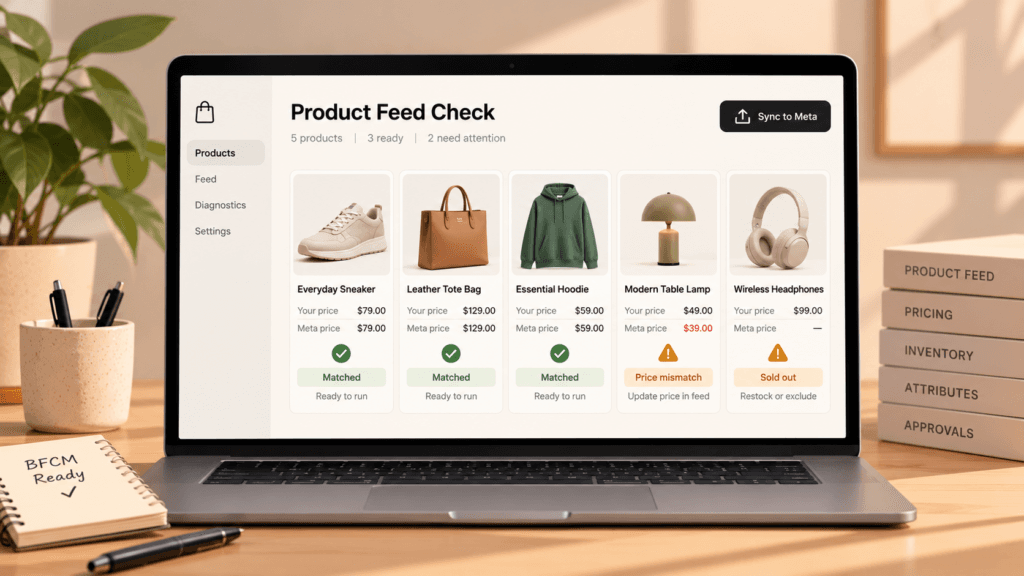
Feed tasks decide whether your ads can even show, and the risk is real. Meta drops out-of-stock items from ads, and Google can reject products whose feed and page prices disagree. Finish the product feed work by November 8, so you have time to fix nasty surprises without panic.
Imagine a hoodie ad that kept running for six hours after the last unit sold. Shoppers felt angry, support felt buried, and the founder felt sick. A clean feed prevents that whole mess.
Meta’s documentation is clear: a sale price must sit below the full price, and you should clear it once the sale ends (Meta for Developers). Google’s help page warns, scarily, that mismatched prices risk disapproval and even a suspended account (Google Merchant Center Help).
Timing is the sneaky part. Shopify notes that product edits usually reach Google within a few hours (Shopify Help Center). So schedule price changes early, never at the last, stressful minute. Stale data is a silent thief.
- 9. Add sale prices with end dates. Remove them when the sale ends, or confusion and angry emails follow.
- 10. Match stock to the site. A sold-out hero that keeps advertising is a quiet, expensive leak that hurts.
- 11. Fix your weak titles and images. Start with the bestsellers, since they carry the most traffic and the most risk.
- 12. Check shipping and tax settings. Surprises at checkout feel like a trap, and shoppers hate traps.
- 13. Test a sample of products. Click ten ads in the feed preview and compare each price with the page, for real peace of mind.
The deeper method lives in this guide to product feed optimization, and it’s easier than it sounds.
Which ad and creative tasks belong on a Black Friday checklist?
On a Black Friday checklist, ad tasks come down to preparation and timing. Build your retargeting pools in October, finish sale creative by November 13, and set budget caps you won’t regret. Ad costs rise late, so early groundwork is cheaper and calmer than a frantic November scramble.
Picture a team that swaps its best ad at the last minute because it felt boring. The new one flops, and the old winner is gone for good. Boring is often another word for proven, and proven is a gift.
GeistM’s tracker saw Meta CPMs creep up 3% in early November 2025 and jump 11% later in the month (GeistM). It shares no sample details, so take it as a warning. The direction still matches common sense.
- 14. Build retargeting audiences. Cart abandoners, product viewers, and your email list, each ready before the rush, because you can’t retarget people you never earned.
- 15. Freeze new creative on November 13. After that date, make sale versions of your winners only, and resist the risky urge to tinker.
- 16. Prepare one concept per phase. Teaser, early access, live, last chance, and extended, so tired ads never run twice as long.
- 17. Set budget caps and a stop line. Decide in advance when a losing campaign pauses, before fear and emotion make a risky call.
- 18. Add offer overlays to catalog ads. Meta’s offer overlays can label a product with its price, a struck-through original price, a percent-off figure, or a free-shipping note (Social Media Today).
Creative production is where tired teams stumble. This guide to ad creative testing shows how to test fairly and keep fresh variants flowing.
Which site and checkout tasks belong on a Black Friday checklist?
Site tasks on a Black Friday checklist protect the last mile. Phones took 57.5% of Cyber Monday’s online sales in 2025 (Adobe), so test your pages on a real phone first. Then test checkout like an impatient, fussy stranger, because that’s exactly who arrives, with thin patience, high hopes, and plenty of choices.
Imagine a tired shopper on a slow train, a full cart, and a checkout that demands an account. She taps away, frustrated, and never returns. That’s a silly, painful way to lose a sale.
Google’s page-experience targets are simple: show main content within 2.5 seconds, respond to taps within 200 milliseconds, and keep layout shift at 0.1 or below, measured at the 75th percentile (web.dev). Slow is the enemy.
- 19. Test speed on mobile. Fix the slow hero image first, since it usually hurts the most.
- 20. Show the total cost early. Extra costs drove 40% of shoppers away in Baymard’s research, and hidden fees feel like betrayal.
- 21. Offer guest checkout. Baymard also found 18% abandoned because the site demanded an account, a needless, painful, avoidable loss.
- 22. Add the payment options shoppers expect. Nobody should get stuck at the last step, and Adobe counted $1.03 billion of buy now, pay later spend on Cyber Monday, a strong signal.
- 23. Place three test orders. Use a discount code, a gift card, and a mobile wallet, then confirm each one works, for real relief.
Both Baymard figures come from its cart abandonment research, and they hurt to read. Hidden fees are the fastest way to lose trust. If you’re building a dedicated sale page, the Black Friday landing page walk-through covers message match and fast, safe loading.
Which stock, shipping, and support tasks belong on a Black Friday checklist?
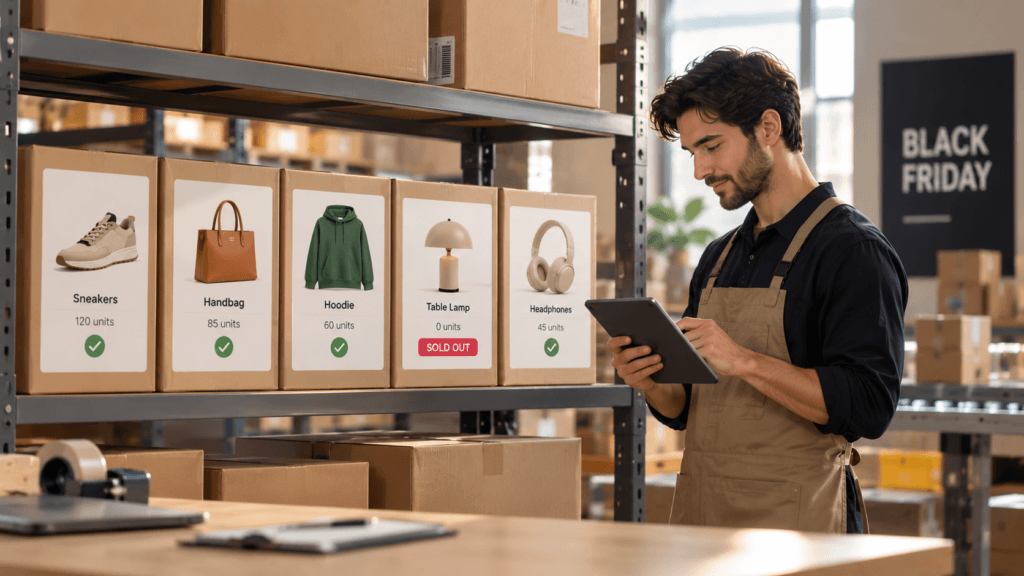
Operations tasks on a Black Friday checklist protect your promise. If you advertise a bestseller and run out, you lose sales and trust at once. Check stock, carrier cutoffs, and support coverage by November 23, so the busiest days feel boring, which is exactly what you want.
Imagine promising delivery before the holidays, then watching the carrier cutoff pass while orders pile up. Customers get worried, support gets angry messages, and the team gets no sleep. Honest dates prevent that ugly spiral.
ShipBob measured Black Friday order volume 236% above an average October Friday, and Cyber Monday 212% above an average October Monday (ShipBob). Your warehouse, your helpers, and your inbox all feel that wave. It’s fast, and it won’t wait.
- 24. Count your hero stock. Know exactly how many of your top ten products you can sell, or stress and panic will count them for you.
- 25. Confirm carrier cutoffs. Check each carrier’s published dates, and promise only what you can deliver.
- 26. Staff the inbox. Plan extra support hours, so tired agents don’t make costly mistakes, and write short, kind, honest answers to the five questions you’ll hear most.
- 27. Review your returns policy. A clear policy builds trust and cuts angry, late-night emails.
Which peak-week and after-sale tasks belong on a Black Friday checklist?
Peak-week tasks on a Black Friday checklist are about watching, not building. Check spend, stock, and site speed on a steady rhythm, fix small problems fast, and don’t change big settings mid-sale. After the weekend, record what happened while it’s fresh, because next year’s plan starts there.
Imagine it’s late on Black Friday morning and the whole team is calm, because the checklist already covered everything. That’s the dream, and it’s earned in October, one calm task at a time.
Pacing matters, and the clock is fast. Shopify’s busiest minute came just after noon on Black Friday, at $5.1 million (Shopify), and Adobe saw $16 million a minute in the Cyber Monday evening peak. Make sure budgets last through both peaks, or you’ll lose the best hours.
- 28. Check budgets at set times. Look at spend, CPA, and stock at fixed hours, not whenever nervous panic strikes.
- 29. Watch sold-out items. Pull them from ads the moment they run out, before shoppers hit a dead end and feel cheated.
- 30. Keep Sunday alive. On the Sunday after Thanksgiving, NRF found 38.7 million people shopping online, so a silent day is a costly one.
- 31. Switch to gifting messages after Cyber Monday. The season runs on, so keep a gentle, honest rhythm going.
- 32. Write the post-mortem. Log what worked, what failed, and what surprised you, even the ugly parts.
The last day plays a different, wild game, so it gets its own guide: Cyber Monday ads.
Which mistakes cost the most when a Black Friday checklist is missing?
Five quiet mistakes cost the most when a Black Friday checklist is missing: a price that disagrees with the ad, a sold-out hero still advertised, a slow phone checkout, a tracking gap, and a panic discount. None looks dramatic alone. Together they quietly drain profit and trust.
- The price gap. The ad shows $49, the page shows $64, and shoppers stop believing you.
- The ghost product. A sold-out hero keeps advertising, and angry shoppers hit a dead end.
- The slow checkout. One weak signal, one frozen button, and a tired shopper leaves.
- The tracking hole. Sales happen, but the dashboard stays silent, and smart campaigns get cut.
- The panic discount. A rival drops prices at midnight, and you copy them without doing the math.
Every one of these costs little to fix in October and hurts to fix in November. That’s the whole point of a checklist: calm, early work saves real money. The pillar guide’s ROAS and margin math shows how to avoid the panic discount.
How does ShopOS help you finish a Black Friday checklist?
ShopOS is a technical product that scales the production side of marketing, which is where most checklists fall apart. It helps with feed checks, creative volume, and scheduled monitoring, and you approve outputs before anything goes live. It’s most useful when the list is long and the pressure is real.
Gavin, the performance marketing agent, pulls sold-out items from live ads and runs scheduled routines such as Catalog Health, SKU Quadrant, ROAS Performance Digest, and Fatigue Detection. Routines start on the Growth plan, at $99 a month. Monica, the creative agent, builds the image and video variants your sale versions need, retiring worn-out ads quickly. That’s a real relief when the whole team is tired, and it feels like a win.
Here’s the honest limit. A small catalog and just a few ads fit on a spreadsheet, and a printed list works fine. ShopOS pays off when tasks 10, 11, and 15 each mean hundreds of items and a weekend of tired, repetitive work. Software should never become another source of stress.
Finish your Black Friday checklist, and enjoy the quiet pride on Cyber Monday night, with a calm heart and a happy team.
Want a calmer, happier November? Try the free tier, which includes 500 credits for testing your feed and creative. Drowning in SKUs? Book a call: Book a call.
FAQ
What should ecommerce brands do before Black Friday?
Start with offers and margin, then fix tracking, the product feed, ads and creative, the site and checkout, and stock and support. Give each stream a date and an owner. Freeze new creative about two weeks out, and test a real purchase before the traffic arrives, so the peak feels calm.
How far in advance should you prepare for Black Friday?
About six weeks is a comfortable minimum for performance brands. For 2026, that means starting in mid-October, with Black Friday on November 27. Early weeks are for calm work on offers, tracking, and the feed, while November is for creative, checkout tests, and stock. Late starters should protect the feed and tracking first.
What are the best Black Friday ecommerce tips?
Pick one clear offer, protect your margin, and keep prices and stock identical across ads, feed, and page. Test on a real phone, show total costs early, and freeze new creative before the peak. Honest urgency beats fake countdowns, and calm preparation beats a bigger budget.
What is the most overlooked item on a Black Friday checklist?
Price and stock consistency across ads, feed, and page. Teams obsess over creative, then lose sales to painful, costly mismatches or sold-out items that keep advertising. Because feed changes can take a few hours to sync, check the numbers early, and again before every major launch moment.
Do small ecommerce brands need a Black Friday checklist?
Yes, but a shorter, calmer one. Small brands still need break-even math, a tested checkout, honest stock counts, and clear tracking. Skip tasks that don’t fit, such as many ad concepts, and keep the ones that protect cash, trust, and sleep.
What should you do after Black Friday ends?
Keep the momentum, and don’t go quiet. Switch to gifting messages, welcome your happy new customers, and save your numbers while they’re fresh. Adobe counted $257.8 billion of online holiday spend from November 1 to December 31, so the season is much longer than the sale weekend.