

 ChatGPT
 Perplexity
 Claude
 Gemini
 Grok
Grok
Key takeaways
- Shopify Black Friday is huge. Merchants sold a stunning, record $14.6 billion over the 2025 Black Friday Cyber Monday weekend, up 27% (Shopify).
- Scripts stopped running on June 30, 2026, so any checkout rule that relied on them needs a rebuild and a careful, honest test (Shopify Dev).
- Product changes typically sync to Google within a few hours, so a late, rushed price edit can leave ads and pages disagreeing (Shopify Help Center).
- Shop Pay handled 32% of orders in the 2025 weekend, so a smooth, familiar checkout really matters.
It’s the night before Black Friday, and a Shopify founder launches her sale. Then comes a painful surprise: the checkout discount she built last year no longer fires.
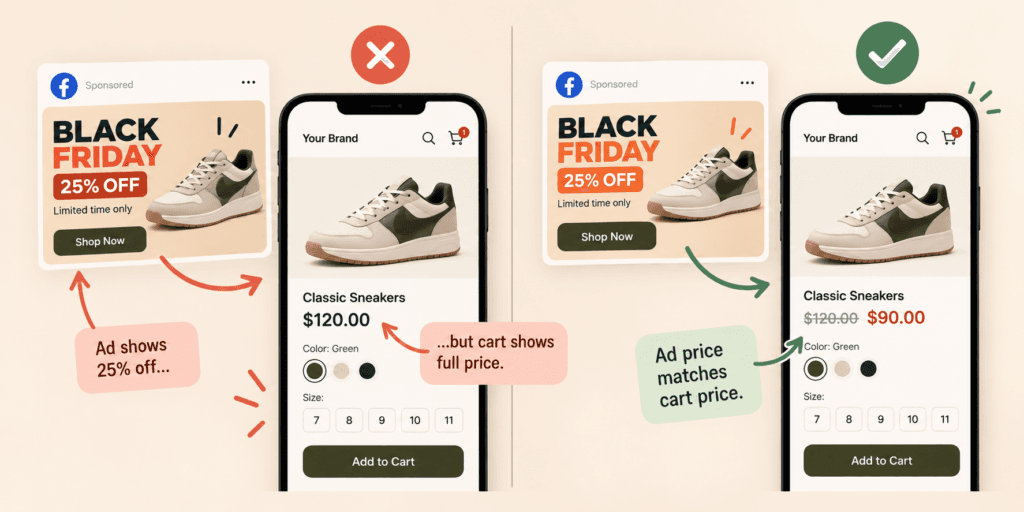
The ads promise 25% off. Her cart shows full price. Her stomach drops, and her hands shake a little.
That quiet failure is avoidable, and fixing it early feels like relief. This guide covers what Shopify Black Friday data says, which settings can silently break, how feed sync really works, and how to prepare ads and checkout before the rush. It’s BFCM Shopify prep, written for brands that run paid ads.
How huge is Shopify Black Friday?
Shopify Black Friday is huge, and a little thrilling. Merchants sold a stunning, record $14.6 billion over the 2025 Black Friday Cyber Monday weekend, up a remarkable 27%, to more than 81 million customers. The busiest minute was dramatic: $5.1 million, just after noon on Black Friday.
The details are striking. More than 94,900 merchants had their best sales day ever, and 15,800-plus entrepreneurs made a first sale, a hopeful sign. Cross-border orders made up a surprising 16% of global orders. Shop Pay sales rose a strong 39%, and 32% of orders used it (Shopify).
Be honest about the limits. Shopify says its figures are approximate, unaudited, and based on gross merchandise volume, so treat them as a strong signal, not a precise audit (Shopify). The direction is loud and clear: the crowd is huge, and it’s fast. Joy, pressure, and fear arrive together.
For the wider picture across every platform, and a real sense of the stakes, read this guide to what BFCM means and how each day differs.
What should you do for Shopify Black Friday 2026 prep?
For Shopify Black Friday 2026 prep, lock your offer, rebuild any checkout rules that used Scripts, sync your feed, test checkout on a phone, and confirm stock. Start with what can silently break, because the risk is real. Scripts stopped running on June 30, 2026, so a discount that worked last year may now do nothing.
Shopify’s change log says editing and publishing new Scripts ended on April 15, 2026, and that all Scripts cease to execute entirely on June 30, 2026 (Shopify Dev). The page doesn’t name the plans affected, so check your own store with care. Don’t assume you’re safe.
Picture the founder who never read that notice. Her tiered discount, her shipping rule, or her payment rule simply stopped. Nobody sent an alarm. Customers saw the wrong price and left, and she never knew why.
Run this quick, calm test list now:
- Place a test order for every offer. Use the exact code or automatic discount shoppers will see, and fix every ugly surprise early.
- Test stacking. Combine your discount with free shipping and a gift card, then read the final total with a skeptical, careful eye.
- Ask your agency or app vendor. Confirm each checkout rule still works without Scripts, because silent failures hurt.
- Check on a phone. The real shopper is probably on one, and the ugly, costly bugs hide there.
The full task list lives in this Black Friday checklist, dated for 2026, and it will calm your nerves.
Which discount method fits a Shopify Black Friday sale?
Shopify offers discount codes and automatic discounts, in four types: a money amount, a percentage, buy X get Y, and free shipping. Use automatic discounts for site-wide sales that shoppers shouldn’t have to hunt for, and codes for emails, creators, and ads you want to track. Test each one carefully on a phone, with stacked offers.
Shopify’s help page is clear about the four types and two methods (Shopify Help Center). It states no combining limits, so test stacking yourself. Don’t gamble with real money, and don’t trust a hunch.
Peace of mind is worth the extra test, and Black Friday morning will feel almost boring. Boring is wonderful, and it’s the best outcome.
Here’s the sneaky, risky part. If a discount only appears at checkout, your ad or feed can show a price that the product page doesn’t. Google checks the feed price against the page, and a mismatch can get products disapproved, or worse (Google Merchant Center Help). That’s scary on the biggest weekend.
So choose one clear rule. Either show the sale price on the product page, or say “discount applied at checkout” in plain words. A confused shopper is a lost shopper, and a lost shopper rarely returns. Confusion kills trust.
How do you sync a catalog for Shopify Black Friday ads?
Install the Google & YouTube channel so products sync to Google Merchant Center automatically, then check it daily, calmly and early. Shopify says the first sync can take up to 24 hours, and later changes typically sync within a few hours. So make price and stock edits early, never in a panic when your ads start.
Google’s help page agrees that products keep syncing automatically when information changes. It also says to check the app periodically, because Google’s errors can differ from Shopify’s (Google Merchant Center Help). Quiet errors are the scariest, most painful kind.
Meta is just as strict, and just as scary. Its catalog documentation says out-of-stock items don’t display in ads at all, and a sale price must be lower than the full price and removed when the sale ends (Meta for Developers). A sold-out hero can quietly drop out of your ads.
Imagine a founder who changes prices at 11:59 p.m. and watches the ad show the old price for hours. The page says one number, the ad says another, and the trust leaks away, a painful, avoidable wound. Follow this order for a calm launch instead:
- Set sale prices the day before. Give feeds time to catch up, and give yourself peace of mind.
- Check the product status page daily. Fix errors while they’re small, before they turn into costly, scary problems.
- Watch stock on your best sellers. Remove sold-out items from ads straight away, before angry shoppers write angry reviews.
- Remove sale prices after the sale. Stale discounts confuse everyone.
The deeper, safer method lives in these guides to product feed optimization and Meta catalog ads, and it’s easier than it sounds.
How should you run Shopify Black Friday ads?
Run Shopify Black Friday ads in three layers: a clean feed, retargeting pools built early, and sale creative frozen by November 13. Shopify gives you the store and the data, but ads still need prices, stock, and creative that agree. Keep the offer simple, the deadline honest, and the page fast.
Start in October. Prospecting builds the audiences you’ll retarget in November, and costs rise late. GeistM’s tracker saw Meta CPMs climb 11% across late November 2025, though it shares no sample details (GeistM). Early work wins, and it’s cheaper and calmer.
Do the math before the creative, and don’t gamble blindly. At 30% off, a $100 product with a $40 cost earns $30 per order instead of $60, so your allowed ad cost halves. That’s a painful squeeze. The wider Black Friday marketing strategy plan shows the full break-even table.
Strong prep makes a happy launch. Then match every ad to its page. The Black Friday landing page walk-through explains message match, and the ad creative testing guide explains how to test fresh versions without panic. Honest matches build trust.

How should checkout and Shop Pay work for Shopify Black Friday?
Treat checkout as your last ad. Shopify reported that 32% of orders in the 2025 weekend used Shop Pay, and Shop Pay sales rose 39%, so a smooth, familiar checkout matters. Test on a phone, show total costs early, and keep your theme light, because slow, messy checkouts hurt trust.
Picture a shopper in a coffee line, thumb on her phone, one tap from buying. Shop Pay remembers her details, and the order is done before her coffee arrives. A clunky form would have lost her, and she’d never think of your brand again.
Baymard’s research shows extra costs push 40% of shoppers to abandon a cart, and 18% leave because a site demands an account (Baymard). Shipping surprises feel like a trap. Trust is earned in the last tap.
Speed matters too. Google’s “good” Core Web Vitals targets are main content in 2.5 seconds, interactions in 200 milliseconds, and layout shift of 0.1 or less (web.dev). Every extra app can add weight, so remove the ones you can’t prove help. Slow is the enemy of trust.
Keep it simple. A quiet theme, a clear offer, and a checkout that works on a phone beat any fancy widget on Shopify Black Friday traffic. Panic installs a week before the sale are a classic, costly mistake.
Does cross-border matter for Shopify Black Friday?
Yes, because 16% of Shopify’s global BFCM orders in 2025 were cross-border, and the US, UK, Australia, Germany, and Canada were among its top countries. If you ship abroad, show delivery times, duties, and the full price early. Surprise fees are the fastest way to lose an overseas shopper.
Baymard’s finding applies again: extra costs sent 40% of shoppers away (Baymard). International buyers feel that fear even more, since returning an expensive parcel is hard. Fear of hidden fees is real.
If you don’t ship abroad, say so clearly on the page. A short, honest note saves a lot of frustration, and honesty feels kind. If you do ship abroad, test one international order from start to finish before the sale, and keep the receipt as proof.
What mistakes hurt Shopify Black Friday sales most?
The costly Shopify Black Friday mistakes are quiet: a discount that silently stopped working, a price edit that synced too late, a sold-out hero still advertised, a slow app-heavy theme, and a checkout that surprises shoppers with fees. None looks dramatic. Each one steals sales from your best hours.
- The dead discount. A rule built on Scripts stops firing, and shoppers see full price.
- The late edit. A price changes at launch, Google syncs hours later, and ads disagree with the page.
- The ghost product. A sold-out hero stays in your ads, and angry shoppers land on a dead page.
- The heavy theme. Too many apps slow the page, and impatient shoppers leave.
- The fee surprise. Shipping appears at the last step, and trust vanishes.
Fixing any of them in October costs little, and fixing them in November hurts. Don’t panic, and fix them early. For ad ideas, browse these Black Friday ad examples.
What does a calm Shopify Black Friday look like?
A calm Shopify Black Friday looks quiet: discounts tested, feed synced, stock honest, and a founder watching a simple dashboard with a cup of tea. The drama happened in October. By launch night, the only feeling left is relief, and maybe a little pride.
Picture the same founder one year later. She tested every offer on her phone, rebuilt her rules after the Scripts shutdown, and scheduled price changes a day early. When the orders pour in, nothing breaks. She smiles, because she earned that peace.
These are the signs of a calm launch:
- Discounts that fire. Every offer works on a phone, and nobody panics.
- Prices that match. Ads, feed, and page tell one true story.
- Stock you trust. Sold-out items vanish from ads, and shoppers stay happy.
- A light, fast theme. Pages load quickly, and impatient buyers stay.
- A quiet inbox. Few angry messages, and a team that still smiles.
The final push has its own plan too. See the guide to Cyber Monday ads for Monday’s late-night rush.
How can ShopOS help with Shopify Black Friday?
ShopOS scales marketing production as a technical product, and that’s where Shopify Black Friday prep gets painful for tired teams. It keeps listings clean, makes fresh ad creative at volume, and runs scheduled checks, with you approving outputs before they ship. It’s most useful when your catalog is big and your team is small.
Richard, the Shopify store manager agent, builds your store, keeps every listing live, and ships updates you’d normally queue for a developer, so slow waits stop hurting you. Gavin, the performance marketing agent, removes sold-out SKUs from ads automatically and runs routines on a schedule, part of the Growth plan, priced at $99 monthly. Monica, the creative agent, produces fresh product images and video, which retires tired ads quickly.
Here’s the honest, simple limit. ShopOS doesn’t replace Shopify’s own checkout or discount tools, and it can’t test your rules for you. If you run a small store with one offer, Shopify’s built-in tools and a careful afternoon are enough.
ShopOS helps most once volume starts to hurt.
Want a calmer November on Shopify? Begin with the free tier, which gives you 500 credits for a safe first run. Managing a large Shopify catalog? Book a call: Book a call.
FAQ
How big were Shopify Black Friday sales in 2025?
Shopify merchants sold a stunning, record $14.6 billion over the 2025 Black Friday Cyber Monday weekend, up a remarkable 27% from the year before. That figure covers the whole weekend, not Black Friday alone. Shopify calls the numbers approximate and unaudited, based on gross merchandise volume, so treat them as a strong, thrilling signal.
When is Shopify Black Friday in 2026?
Black Friday lands on Friday, November 27, 2026, with Cyber Monday on November 30 and Thanksgiving a day earlier, on November 26. Shopify merchants face the same dates as everyone else, so start your offer, feed, and checkout tests early, about six weeks out, and freeze new ad creative around November 13 to stay calm. Don’t panic.
How do you do 50% off on Shopify?
Shopify lets you create a percentage discount as either a discount code or an automatic discount. Set it to 50, choose the products, and test the final total on a phone. Check your margin first, because 50% off can wipe out profit and hurt, and make sure your ads and prices match, so shoppers feel safe.
What happened to Shopify Scripts?
Shopify ended editing and new publishing on April 15, 2026, and all Scripts stopped executing on June 30, 2026. Any checkout rule that relied on Scripts needs a rebuild and a careful, honest test, because silent failures are costly. Ask your agency or app vendor to confirm each discount, shipping, or payment rule still works.
Does Shopify sync products to Google automatically?
Yes, through the Google & YouTube channel. The first sync can take up to 24 hours, and later edits normally land within a few hours. That delay is why you should change prices early, check product status daily, and never trust a rushed, last-minute edit. Calm, early changes win.
How many Black Friday Shopify apps should you run?
As few as you can prove help. Every app can add weight, risk, and confusion, and slow pages hurt sales. Test each app on a phone, remove the ones you don’t need, keep your Shopify Black Friday store light, and freeze changes a week before the sale so nothing new breaks during the peak. Light stores win.