
AI for Ecommerce·Sep 26, 2026
TL;DR: Product feed optimization means cleaning up the product data ...

TL;DR: Product feed optimization means cleaning up the product data Google and Meta use to build your shopping ads. Weak titles and wrong stock quietly waste money on every click. Fix the fields each platform reads first, keep stock honest, then enrich the data. It’s unglamorous work, and it pays back surprisingly fast.
Key takeaways
A shopper sees a Shopping ad for a navy rain jacket. Great price. She clicks, excited.
The product page shows a higher price. Worse, the navy one is sold out.
She closes the tab in frustration and never comes back. The brand paid for that click and lost a little of her trust.
Nobody on the team noticed a thing. The ad looked fine, and so did the product page. The painful problem hid in the gap between them. That gap is the product feed, and closing it is exactly what product feed optimization does.
A product feed is a structured file listing every product you sell, with fields like title, price, and stock status. Google Shopping and Meta catalog ads read it to build ads automatically. When the feed is wrong, every ad built from it is wrong too, and nobody gets a friendly warning.
Luckily, most stores never write the feed by hand. On Shopify, the Google & YouTube app connects your store to Google Merchant Center and syncs product data from your Shopify admin (Shopify).
That easy convenience hides a real, costly risk. The sync faithfully copies whatever sits in your product data, sloppy titles and empty fields included.
So a Shopify product feed is only as healthy as the catalog behind it. Good product feed optimization starts in your product data, not in the ad account.
What is a GTIN? A GTIN, or Global Trade Item Number, is the unique, trusted barcode number a manufacturer assigns to a product. Google uses it to confidently match your item with the exact product shoppers search for.
Because ads never check your work, and that’s scary. Google and Meta trust your feed, so a wrong price or a sold-out item gets repeated in every impression you pay for. Product feed optimization stops that silent, costly waste. It also protects shopper trust, which is far harder to win back than a lost click.
The trust damage is well documented. In Salsify’s survey of 1,910 online shoppers in the US and UK, 54% dropped a purchase because of conflicting product information, and 71% returned an item over an inaccurate description (Salsify).
Returns hurt twice. You lose the sale, then you painfully pay again to process the return.
Google is strict and refreshingly clear about honesty here. Merchants must “accurately submit the product’s availability and match the availability from your landing page, checkout pages, and structured data” (Google Merchant Center Help).
There’s a newer, surprising reason to care. AI shopping tools now read product data directly. OpenAI’s commerce documentation describes product feeds as the way merchants share structured data so ChatGPT can surface their products accurately. A messy feed could soon cost you sales in places you can’t even see.
Start with the fields each platform requires, because a broken required field can block a product entirely. For Google, the required list covers seven basics, from ID and title to availability and price. Meta asks for similar basics with its own limits. Smart product feed optimization respects both strict rule books at once.
The limits differ more than most busy teams realize, and that surprise hurts:
| Field | Google Merchant Center | Meta catalog |
|---|---|---|
| Title | Up to 150 characters | Up to 200 characters, 65 recommended |
| Description | Up to 5,000 characters | Up to 9,999 characters |
| Availability | In stock, out of stock, pre-order, backorder | In stock or out of stock |
| Images | 500 x 500 pixels minimum for all products from January 31, 2027 | JPEG or PNG, at least 500 x 500 pixels, up to 8 MB |
| ID | Unique product ID | Up to 100 characters, SKU recommended |
Sources worth trusting: Google Merchant Center product data specification and Meta for Developers catalog fields.
Notice the sneaky trap in that table. A long title written for Meta’s generous limit gets brutally cut on Google. A title tuned only for Google can look awkward and weak on Meta.
The honest fix is simple. Make the first 65 characters work alone, then add useful detail after that point.
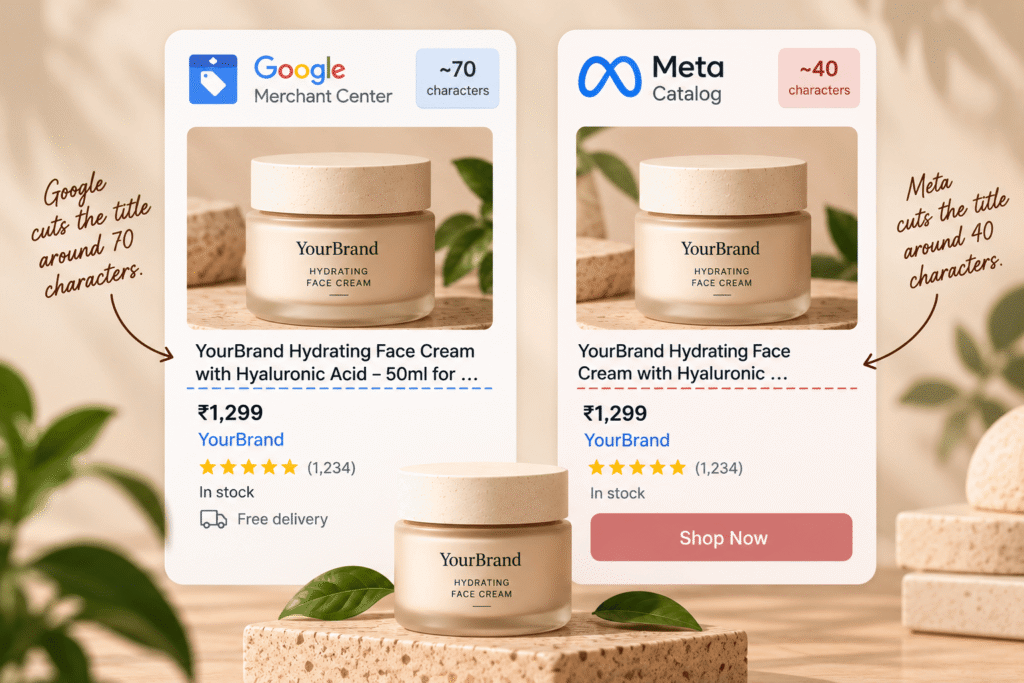
It puts the words shoppers actually search for where they’ll really see them. Lead with the brand and product type, plus the one detail that decides the purchase, inside the first 70 characters. Add size or material after that. Clear titles are the fastest, cheapest, most satisfying win in product feed optimization.
Google’s guidance is blunt and genuinely useful. “Users will usually notice only the first 70 or fewer characters of your title, depending on screen size.” It also says to “put the most important details first” and warns against promotional text or “capital letters for emphasis” (Google Merchant Center Help).
Here’s the painful difference product feed optimization makes on one product.
Before: “BEST SELLER!! Stylish Everyday Jacket, Free Shipping”
After: “[Brand] Women’s Waterproof Rain Jacket, Navy, Packable Hood, Size M”
The first title shouts and says nothing useful. The second calmly answers what a shopper is silently asking: what it is, who it’s for, and whether it’ll keep them dry.
Title patterns that reliably work well by category:
These are useful starting points, not strict laws. Check what your real shoppers type, then adjust honestly.
It keeps stock and prices synced as fast as they change, and pulls unavailable products out of ads automatically. Stale availability is the most expensive feed mistake, because you pay for clicks that can never convert. Honest stock data is where product feed optimization protects budget directly, not just performance.
Meta is blunt about sold-out products: its catalog documentation says out-of-stock items won’t appear in your ads at all (Meta for Developers). That sounds safe, but a lagging feed flips it around painfully. Sold-out items keep running, while restocked best sellers stay hidden.
Variants create their own quiet, confusing mess. A jacket in six sizes and four colors is 24 separate products to a feed. If only size M sells out, the whole jacket shouldn’t vanish.
Warning signs your feed is quietly failing you:
This is where ShopOS helps most, and honestly where most teams struggle. Gavin, the performance marketing agent, manages the catalog feed and SKU configuration, with out-of-stock enforcement that pulls unavailable SKUs from ads. You choose between three stock status modes and set a fallback percentage, then check an impact preview before any bulk update runs.
Scheduled Catalog Health and SKU Quadrant routines keep checking quietly in the background. Stale data gets caught early, which makes product feed optimization a calm habit instead of a painful monthly scramble.
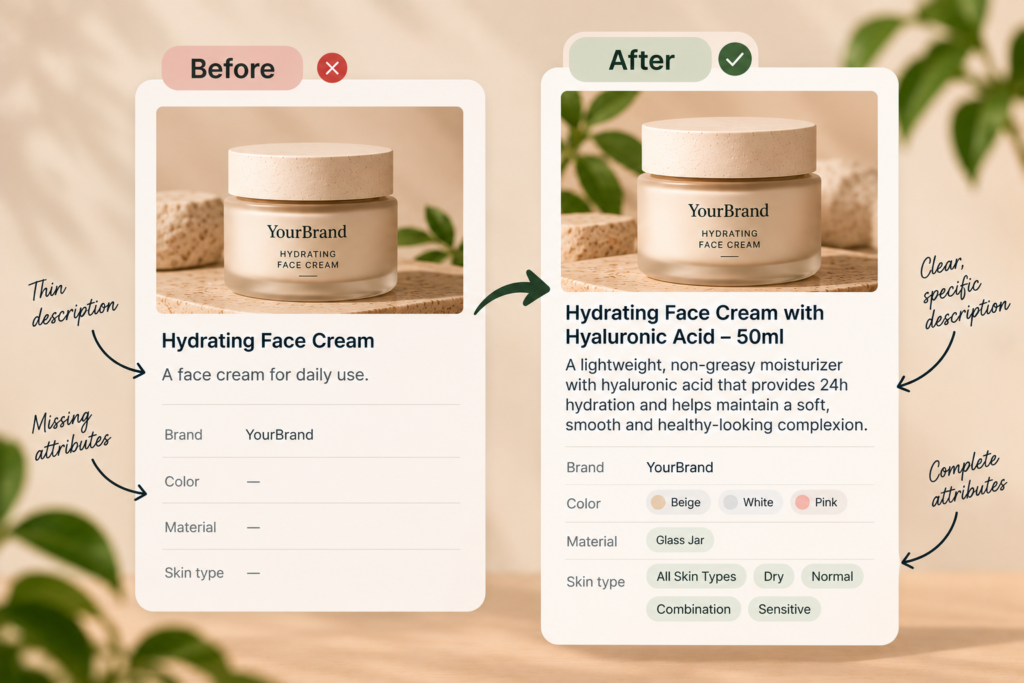
Product feed enrichment means adding helpful detail beyond the required fields: identifiers, attributes like color and material, stronger descriptions, and better images. Think of it as giving shoppers real confidence. It’s worth it once the basics are clean. Enrichment is the exciting, advanced stage of product feed optimization, because it helps platforms match products to specific, high-intent searches.
Start with identifiers, the easiest win. Google says including a GTIN “can increase the performance of the product.” It’s equally firm about honesty: “Only provide a GTIN if you’re sure it’s correct. When in doubt, don’t provide a GTIN (for example, don’t guess or make up a value)” (Google Merchant Center Help).
Then fill in the attributes shoppers filter by. Details like color and material help platforms place products in narrower, more valuable searches where eager buyers wait.
Descriptions deserve real effort too. Many catalogs still carry thin, lazy, forgettable manufacturer text.
Here’s the tough reality. Enriching thousands of products by hand is slow, tedious, exhausting work that never truly finishes, and product feed optimization stalls.
ShopOS was built for exactly that kind of volume. Its agents build and refresh product listings and descriptions across a large catalog, while Brand Memory keeps the voice and rules consistent. You review every change before anything goes live, so nothing risky slips through.
It honestly depends on how many channels you sell through. If you only advertise on Google and Meta, a clean catalog plus the platforms’ own connections go a long way. Selling across many marketplaces is different, and dedicated product feed management tools genuinely earn their cost there. Be honest about which situation you’re in first.
Here’s a fair, honest comparison:
| Option | Best for | Honest limits |
|---|---|---|
| Shopify sales channel apps | Small catalogs on Google and Meta | Copies your product data as-is, flaws included |
| Dedicated feed management tools | Many channels and marketplaces with complex rules | Another tool to manage, and they don’t write better product content |
| ShopOS | Brands on Meta and Google needing clean ad feeds and product content at scale | Not a standalone product information system or multi-marketplace feed tool |
That last row matters, and it’s worth being honest about. ShopOS doesn’t pretend to replace a full feed management platform. It focuses on keeping ad feeds clean and producing the content that makes products worth clicking, which is the half of product feed optimization most tools skip.
Catalog upkeep is also the thankless job most teams quietly forget. The ShopOS guide on choosing a Shopify marketing agency explains why it so often falls through the cracks. Once your feed is clean, make those products stand out in Meta catalog ads.
Worried about what ugly surprises are hiding in your catalog? The free tier includes 500 credits to find out. Managing thousands of SKUs? Book a call: Book a call.
As often as your prices and stock change, and honestly, that’s often. A store running frequent sales needs far more frequent syncs than a slow, steady catalog. The real test is simple: if shoppers ever click an ad and find a different price or a sold-out item, your feed updates too slowly.
Many products, like custom or handmade items, genuinely don’t have one, and that’s perfectly fine. Google says to leave the field empty rather than guess. Never invent a number, however tempting an empty field feels. Use accurate brand and MPN details where you have them instead.
They’re closely related but not identical, and the naming is genuinely confusing. The catalog is your full product data, while the feed is the formatted file sent to a channel like Google. Meta also calls its stored feed a catalog. Either way, fixing the source data fixes both.
Mostly, yes, which feels reassuring. Shopify’s Google & YouTube app syncs your product data to Google Merchant Center. The catch is that syncing copies your data exactly as it is. Weak titles and missing attributes flow straight into your ads unless you fix them first, which is why product feed optimization still matters.
Start with anything that blocks or misleads, like wrong availability, prices, or broken links. Then fix weak titles, because they drive search matching and clicks. After that, add real GTIN and attributes like color and size. That order protects budget first, then steadily improves performance.
It’s increasingly likely, and that’s exciting news for careful brands. OpenAI’s commerce documentation describes product feeds as the way merchants share structured product data so ChatGPT can surface products accurately. Clean, specific, honest data serves both ads and AI answers, so the same hard work pays off twice.

