
AI for Ecommerce·Sep 26, 2026
TL;DR: Meta catalog ads turn your product feed into personal ...

TL;DR: Meta catalog ads turn your product feed into personal ads for every shopper. When they burn money, the cause is usually one of two boring problems: broken data or forgettable creative. Fix the messy feed first, then give products a real reason to stop the scroll. Done well, Meta catalog ads become a steady, trusted way to win back lost sales.
Key takeaways
It’s Monday morning. A tired founder opens Ads Manager and sighs.
The catalog campaign spent more than anything else last week. The sales it drove? Barely worth a screenshot.
Someone says what everyone fears: “Catalog ads just eat budget.” They pause the campaign in frustration and move on.
Here’s the painful truth. Meta catalog ads usually aren’t the real problem. The data and creative feeding them are. This guide shows how to find the hidden leak and fix it, one honest step at a time.
Meta catalog ads are ads Meta builds automatically from your product catalog. You upload products once, which feels wonderfully easy. Meta then shows each shopper the items they’re most likely to buy, with prices and images pulled live from your feed. Meta now brands them Advantage+ catalog ads, but most tired marketers still just say catalog ads.
Meta’s own documentation describes the exciting promise simply. You can “display ads for thousands of items to the right audience,” with the catalog feed used to “automatically deliver images, descriptions, and prices in your ads” (Meta for Developers).
That automation is the huge appeal. One campaign can cover your whole store without anyone painfully building thousands of ads by hand.
It’s also the scary risk. If the data is wrong, Meta repeats that mistake thousands of times, fast.
What is a product catalog? A product catalog is the structured list of everything you sell, with a price, image, and stock status for each item. Meta catalog ads trust it completely, so one wrong value gets repeated everywhere.
Meta catalog ads match products to people using signals from your pixel or app events. When someone views a product or adds it to cart, Meta quietly records which item they touched. Retargeting follows that trail. Broad campaigns trust Meta’s own prediction to find eager new shoppers who’ll likely love your products.
Meta helpfully groups those signals into four standard events: Search, ViewContent, AddToCart, and Purchase (Meta for Developers). A classic audience targets people “that viewed or added products to a cart, but didn’t finish the purchase.”
There are two main ways to run Meta catalog ads, and they carry very different risks:
Here’s the critical part most guides skip. Every event must carry a product ID that exactly matches an ID in your catalog. If your pixel sends one format and your feed uses another, Meta is blind and can’t connect the shopper to the product. Retargeting quietly breaks, and no warning flashes in the dashboard.
Meta catalog ads waste budget when Meta is forced to guess. Mismatched IDs and stale stock weaken the signals it trusts, and so do cluttered titles and boring flat photos. The algorithm still burns your money, just on worse matches. The frustrating result looks like a bad channel, when it’s really bad inputs hiding in plain sight.
The most common leaks, roughly in order of damage:
The honest take? Most panicked brands blame targeting first. The feed is far cheaper and easier to check, so check it before touching audiences.
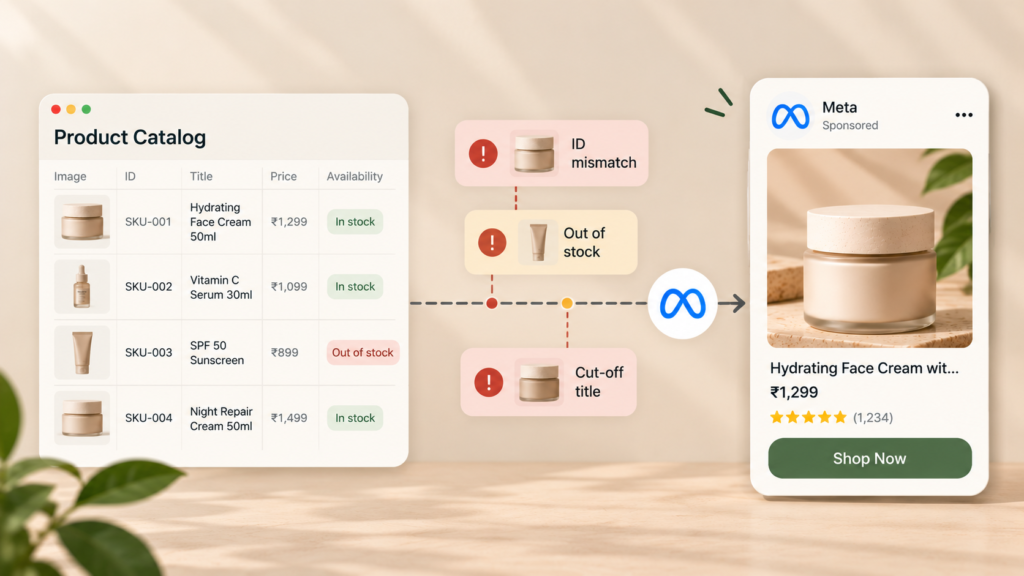
Start with the fields Meta reads on every impression. Use your SKU as the product ID, keep titles short and clear, and send honest stock status with clean images that meet Meta’s size rules. Then group products into sets by margin. A healthy feed makes Meta catalog ads cheaper, often surprisingly fast.
Meta’s field rules are strict but refreshingly clear (Meta for Developers):
| Field | What Meta asks for |
|---|---|
| id | Up to 100 characters. “Use the item’s SKU if possible.” |
| title | Up to 200 characters, 65 recommended so it isn’t cut off |
| description | Up to 9,999 characters, with specific product features |
| availability | “in stock” or “out of stock” |
| image_link | JPEG or PNG, at least 500 x 500 pixels, up to 8 MB |
A few simple, satisfying fixes pay off fast:
Feeds get messy across Google and Meta at the same time, which is exhausting to untangle. The full walk-through lives in the ShopOS guide to product feed optimization.
Give each product context a plain photo can’t carry. Honest price labels and beautiful lifestyle images help Meta catalog ads win attention in a crowded feed. Short product videos help too. Meta’s delivery system is now built to handle far more creative than before, so a thin creative supply is a real, costly handicap.
Meta now supports dynamic overlays, a welcome fix for dull photos. They show catalog details, like a price or a discount, as a bold label on the ad image. Four label types exist: price, strike-through price, percentage off, and free shipping. The feature currently delivers only to Facebook Feed (Social Media Today).
Creative volume matters far more than it used to, and that should worry lean teams. Meta’s engineering team reported that more than a million advertisers used its generative AI tools to create more than 15 million ads in a single month. It rebuilt its ad retrieval system to cope with that massive growth (Engineering at Meta).
That opens a tough, unfair gap for small teams. A rival can suddenly show ten polished versions of a product while you show one tired photo.
Video is the other powerful lever for Meta catalog ads. ShopOS has a detailed case study on scaling video catalog ads while cutting production costs, so this guide won’t repeat those numbers.

Start with safe retargeting, then earn your way into prospecting. Retargeting Meta catalog ads show products people already viewed, so intent is high, and wins come quickly. Prospecting reaches strangers, so it lives or dies on creative. Scale it only once your feed is clean and your images are strong enough to beat cold indifference.
A simple, calm order of operations:
That last step needs real discipline. A lucky week can fool anyone, and it hurts to scale a false winner. The ShopOS guide to ad creative testing explains how to run a fair comparison on Meta.
One more honest warning. Catalog ads can decline slowly as audiences see the same products again and again. Catching that early is its own job, covered in the guide to AI ad monitoring.
ShopOS treats Meta catalog ads as a data problem and a production problem at once. Its performance marketing agent, Gavin, looks after ad templates, the catalog feed, and SKU setup. Monica, the creative agent, produces the lifestyle images and video that plain feeds lack. You approve risky changes before anything goes live.
The catalog side directly targets the painful, costly leaks above. Gavin can pull sold-out SKUs from ads automatically. Before any bulk catalog change goes live, you see its likely impact first, which keeps nasty surprises away.
Scheduled routines like Catalog Health and SKU Quadrant keep watching, so problems don’t wait for someone to notice. Details sit on the Gavin agent page.
This is where the technical product genuinely earns its keep. Producing fresh visuals for hundreds of SKUs by hand is slow and exhausting. ShopOS makes that volume realistic for a small team, and Brand Memory keeps every image true to your brand.
Pricing is public, which is refreshingly honest. Scheduled routines arrive with the $99 Growth plan, Meta Catalog Overlay creation comes with Business at $199, and automated Meta catalog ads publishing is part of Custom plans (ShopOS pricing).
One honest limit worth knowing: ShopOS connects to Meta and Google, so TikTok catalog campaigns sit outside it.
Want to see your catalog’s weak spots before changing anything? The free tier includes 500 credits to test it. Running a large catalog on Meta? Book a call: Book a call.
Yes, and the naming is honestly confusing. Meta used to call them dynamic ads, and many marketers still say dynamic product ads or DPAs. Meta now brands them Advantage+ catalog ads. The simple core idea hasn’t changed: Meta builds ads automatically from your catalog and matches items to shoppers using pixel events.
The usual culprit is a frustrating mismatch between product IDs in your pixel events and IDs in your catalog. When they disagree, Meta can’t tell which item a shopper viewed. Check that the same SKU appears in your feed and your pixel, in the exact same format and case.
For retargeting, yes, and skipping it is a costly mistake. Meta needs App Events or the Meta Pixel to record which products people view and buy. Without those events, Meta has no trail to follow. Broad campaigns can still find shoppers, but learning suffers badly without clean data.
There’s no magic number, but one giant set is a common, costly mistake. Group products by purpose, such as best sellers and clearance, and give each set its own budget. That keeps low-margin items from quietly eating spend meant for the products that truly pay back.
Out-of-stock items don’t display in Meta ads at all, so check stock data first. Then look for disapproved items or broken product links in Commerce Manager. If best sellers keep vanishing, your feed probably updates too slowly to keep up with real inventory, and that silent lag hurts.
Often, yes, especially for retargeting, because they’re highly automated. Small catalogs can still win. The catch is creative: with fewer products, plain photos get repetitive and dull fast, so lifestyle images and honest price labels matter even more. Prove retargeting first, then consider prospecting.

